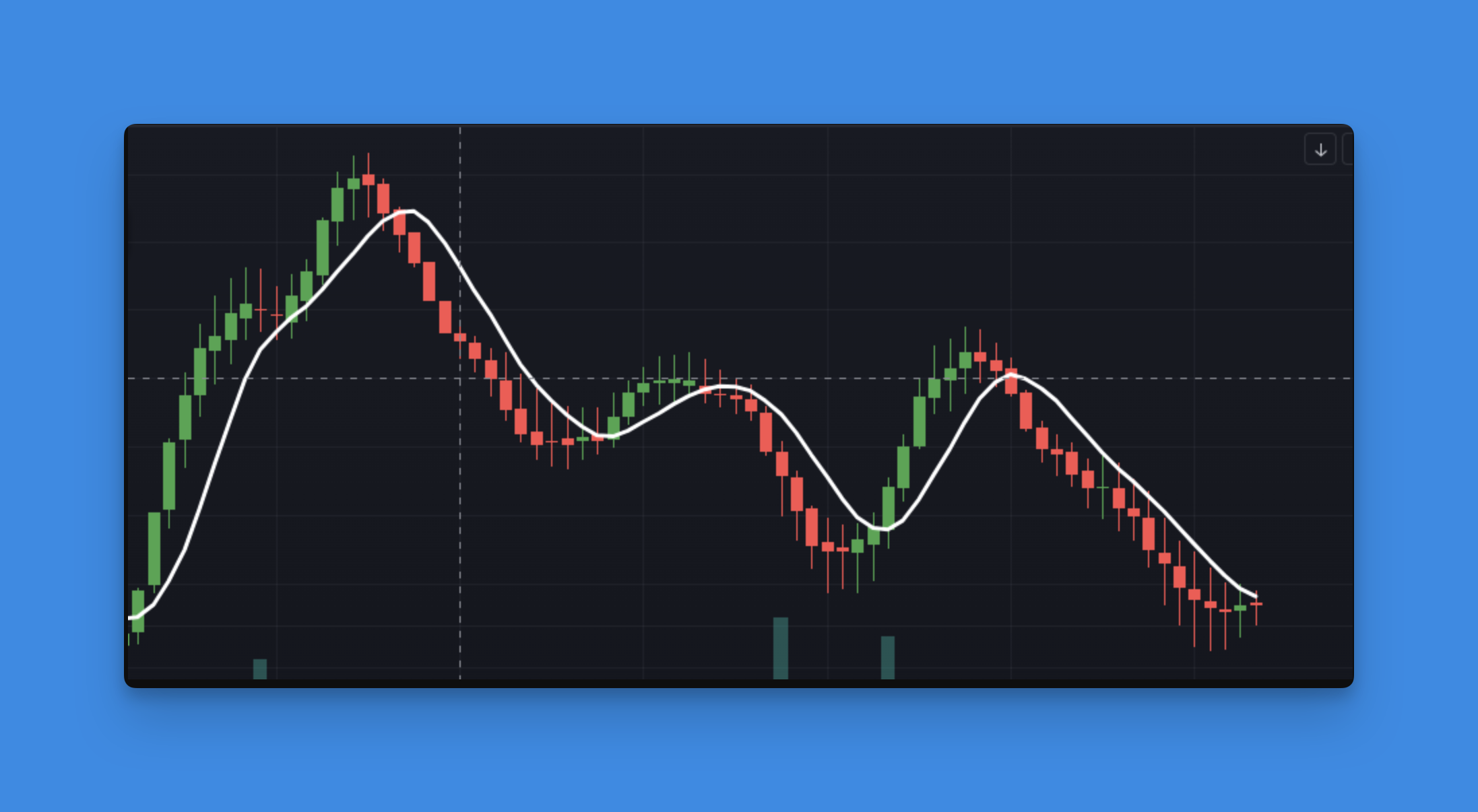
Understanding the ta.linreg() Function in Pine Script v6: Complete Guide to Linear Regression Trading
Ever looked at a messy chart and wished you could just draw a clean line through all that noise to see where the market's really heading? That's exactly what Pine Script's ta.linreg() function does for you. It's like having a mathematical crystal ball that finds the perfect trend line through your price data - no guesswork, no subjective line drawing, just pure mathematical precision.

What Does ta.linreg() Actually Do?
Think of ta.linreg() as your personal trend detective. While other traders are squinting at charts trying to figure out which way the market's heading, this function does the heavy lifting for you. It analyzes your price data over a specific period and calculates the mathematically perfect trend line - the one that has the smallest possible distance from all the price points.
Unlike moving averages that can lag behind price action, linear regression gives you a forward-looking perspective on where prices might be heading based on the current trend's mathematical trajectory.
Here's the syntax breakdown:
ta.linreg(source, length, offset) → series float
Parameters explained:
- source: Your data input (close, high, low, hl2, hlc3, etc.)
- length: The lookback period (number of bars to analyze)
- offset: Time displacement - positive shifts forward, negative shifts backward (usually 0)
Understanding Linear Regression in Trading Context
Before we dive deeper, let's talk about why linear regression matters in trading. Traditional indicators like simple moving averages smooth out price data but can lag significantly during trending moves. Linear regression, on the other hand, fits a straight line through recent price action that can extend beyond the current bar, giving you insight into potential future price direction.
The Mathematical Foundation (Simplified for Traders)
Here's the core formula that makes ta.linreg() work:
linreg = intercept + slope × (length − 1 − offset)
Don't let the math scare you - Pine Script handles all the calculations automatically. Here's what happens behind the scenes:
- The function analyzes your specified data points (usually closing prices)
- Calculates the slope - how steep the trend line should be
- Determines the intercept - where the line would cross the y-axis
- Applies the least squares method - finds the line with minimal distance from all price points
Think of it like connecting dots in a pattern. If you had 20 price points scattered on a chart and wanted to draw the single best line through them, linear regression finds that mathematically optimal line.
Key Advantages of ta.linreg() Over Traditional Indicators
Reduced Lag
Unlike exponential moving averages that react to price changes after they happen, linear regression can project where the trend is heading based on current momentum.
Mathematical Precision
No guesswork involved - the line is calculated using statistical methods that minimize errors.
Versatility
Works well in trending markets and can be combined with other indicators for robust trading strategies.
Practical Applications for ta.linreg() in Trading
1. Superior Trend Identification
The linear regression line gives you crystal-clear trend direction:
Bullish signals:
- Regression line slopes upward
- Price consistently stays above the line
- Line acts as dynamic support
Bearish signals:
- Regression line slopes downward
- Price remains below the line
- Line acts as dynamic resistance
Sideways markets:
- Flat regression line
- Price oscillates around the line
- Consider using range-bound strategies
2. Entry and Exit Timing
Smart traders use ta.linreg() for precise timing:
Long entry opportunities:
- Price breaks above regression line with volume
- Pullback to line during uptrend (support test)
- Regression line slope turns positive
Short entry signals:
- Price breaks below regression line
- Rally back to line during downtrend (resistance test)
- Regression line slope turns negative
3. Dynamic Support and Resistance
Unlike static horizontal lines, the regression line moves with price action, providing adaptive support and resistance levels that adjust to market conditions.
4. Trend Strength Assessment
The slope angle of your regression line tells you how strong the current trend is:
- Steep slopes = strong trends
- Gentle slopes = weak trends
- Flat lines = consolidation phases
Building Your First Linear Regression Indicator
Let's start with a basic implementation and then enhance it step by step:
Basic Linear Regression Line
//@version=6
indicator("Linear Regression Trend Line", overlay=true)
// Input parameters for customization
length = input.int(20, "Regression Length", minval=2, maxval=200)
src = input.source(close, "Source Data")
// Calculate the regression line
regressionLine = ta.linreg(src, length, 0)
// Plot the line with custom styling
plot(regressionLine, color=color.blue, linewidth=2, title="Linear Regression")
Enhanced Version with Multiple Features
//@version=6
indicator("Advanced Linear Regression System", overlay=true)
// User inputs
length = input.int(20, "Regression Length", minval=2, maxval=200)
src = input.source(close, "Source Data")
showChannels = input.bool(true, "Show Regression Channels")
deviation = input.float(2.0, "Channel Deviation", minval=0.1, maxval=5.0)
// Calculate regression line and slope
regressionLine = ta.linreg(src, length, 0)
slope = (regressionLine - ta.linreg(src, length, 1))
// Calculate standard deviation for channels
stdev = ta.stdev(src, length)
upperChannel = regressionLine + (stdev * deviation)
lowerChannel = regressionLine - (stdev * deviation)
// Color the line based on slope direction
lineColor = slope > 0 ? color.green : slope < 0 ? color.red : color.gray
// Plot regression line
plot(regressionLine, color=lineColor, linewidth=2, title="Regression Line")
// Optional: Plot regression channels
plot(showChannels ? upperChannel : na, color=color.gray, linewidth=1, title="Upper Channel")
plot(showChannels ? lowerChannel : na, color=color.gray, linewidth=1, title="Lower Channel")
// Fill the channel area
fill(plot(upperChannel), plot(lowerChannel), color=color.new(color.blue, 95), title="Channel Fill")
This enhanced version gives you trend direction through color coding and adds regression channels for better price analysis.
Professional Trading Strategies Using ta.linreg()
Mean Reversion Strategy
When price moves significantly away from the regression line, it often returns to the mean. Here's how to capitalize on this:
// Signal when price is more than 2 standard deviations from regression line
deviation = math.abs(close - regressionLine) / ta.stdev(close, length)
meanReversionSignal = deviation > 2.0
// Enter positions when price is oversold/overbought relative to trend
longSignal = close < lowerChannel and ta.rsi(close, 14) < 30
shortSignal = close > upperChannel and ta.rsi(close, 14) > 70
Trend Following Strategy
Use the regression line slope for trend-following entries:
// Calculate slope angle
slopeAngle = math.atan(slope) * 180 / math.pi
// Strong trend signals
strongBullish = slopeAngle > 30 and close > regressionLine
strongBearish = slopeAngle < -30 and close < regressionLine
Combining with Other Indicators
Linear regression works exceptionally well when combined with:
- Volume analysis for confirmation
- RSI for momentum verification
- Bollinger Bands for volatility context
Accelerate Your Development with Pineify
Writing complex Pine Script indicators from scratch can be time-consuming and error-prone. If you want to focus on strategy development rather than coding syntax, Pineify offers a visual approach to building sophisticated indicators.
With Pineify, you can combine ta.linreg() with multiple other indicators without hitting TradingView's 3-script limit. Build comprehensive trading systems that include regression analysis, volume indicators, momentum oscillators, and custom alerts - all in one streamlined workflow.
Website: Pineify
Want to see what else it can do? Check out all the features here.
Advanced Tips for Mastering ta.linreg()
Optimal Length Selection
The regression length dramatically affects your results:
Short periods (5-14 bars):
- More sensitive to recent price action
- Better for scalping and day trading
- Higher signal frequency but more noise
Medium periods (15-30 bars):
- Balanced between responsiveness and stability
- Good for swing trading
- Most versatile for general use
Long periods (50+ bars):
- Smoother, more stable trends
- Better for position trading
- Fewer false signals
Time Frame Considerations
Linear regression behaves differently across timeframes:
- 5-minute charts: Use shorter lengths (10-20)
- Hourly charts: Medium lengths work well (20-30)
- Daily charts: Longer periods provide better signals (30-50)
Market-Specific Optimization
Different markets require different approaches:
- Forex: Tends to trend smoothly, longer periods often work better
- Crypto: High volatility requires shorter, more responsive settings
- Stocks: Medium periods balance trend following with noise reduction
Common Mistakes to Avoid
Over-Reliance on Single Indicator
Linear regression is powerful but not infallible. Always combine it with:
- Volume confirmation
- Support/resistance levels
- Market context analysis
Ignoring Market Conditions
Linear regression works best in trending markets. In choppy, sideways conditions, expect more false signals and consider using range-bound indicators instead.
Wrong Time Frame Selection
Using daily regression signals for 5-minute trades (or vice versa) leads to poor results. Match your regression period to your trading timeframe.
Backtesting Your Linear Regression Strategy
Before implementing any strategy, proper backtesting is crucial. Test your regression-based signals across different market conditions to understand their performance characteristics.
Summary: Why ta.linreg() Deserves a Spot in Your Toolkit
The ta.linreg() function offers something unique in the Pine Script arsenal - mathematical precision combined with forward-looking capabilities. Unlike lagging indicators that tell you what already happened, linear regression shows you where the market momentum is pointing.
Whether you're building simple trend-following systems or complex multi-indicator strategies, ta.linreg() provides a solid mathematical foundation for your trading decisions. Start with the basic implementation, experiment with different periods and combinations, and see how this powerful function can enhance your trading edge.
Remember: successful trading isn't about finding the perfect indicator - it's about understanding your tools and using them consistently within a well-defined strategy. The ta.linreg() function is simply one more weapon in your analytical arsenal, but used correctly, it can be a formidable one.