Pine Script Converter: Complete Guide to Converting Pine Script Code

· 9 min read

So you've got some Pine Script code that's giving you headaches? Maybe it's an old script that won't run anymore, or you want to move your TradingView strategy to Python. Trust me, I've been there. Converting Pine Script can feel like trying to translate ancient hieroglyphs sometimes, but it's totally doable once you know the tricks.

Pineify | Best Pine Script Generator

Why Pine Script Conversion Matters More Than You Think

Pine Script is TradingView's specialized programming language designed for creating custom indicators and trading strategies. The challenge? TradingView keeps evolving their scripting language to add new features and improve performance. We're currently on Pine Script v6, and each version brings significant improvements that can break older code.

Here are the main reasons traders need to convert their Pine Script code:

Version Compatibility Issues: Older scripts often throw compilation errors when TradingView updates their platform. If you're still running v4 scripts, you're missing out on crucial features and stability improvements.

Cross-Platform Migration: Maybe you want to take your proven TradingView strategy and run it on MetaTrader, Python, or another trading platform. This requires translating Pine Script logic into different programming languages.

Strategy Enhancement: Converting an indicator into a full strategy requires structural changes to add entry/exit logic, risk management, and backtesting capabilities.

The Built-in TradingView Converter (Your First Stop)

Before diving into manual conversion, TradingView offers an automatic converter that handles most v4 to v5 migrations. This built-in tool can save you hours of tedious syntax updates.

The Best Pine Script Generator

Here's the step-by-step process:

  1. Open your legacy script in the Pine Editor (look for //@version=4 at the top)
  2. Access the conversion tool by clicking the three dots in the Pine Editor's top-right corner
  3. Select "Convert to v5" from the dropdown menu
  4. Review the results - the converter handles most syntax changes automatically
  5. Test thoroughly - while the converter is good, always verify your converted script works as expected

The automatic converter successfully handles about 85% of common conversion scenarios. It's particularly good at updating function names, namespace changes, and basic syntax modifications. However, complex custom functions and advanced features might need manual adjustment.

Major Changes Between Pine Script Versions

Understanding what changes between versions helps you prepare for conversion challenges. Here are the most significant updates you'll encounter:

Version Declaration and Core Structure

Every Pine Script starts with a version declaration. Updating from //@version=4 to //@version=6 is more than just changing a number - it unlocks new features and requires syntax updates.

Function Namespace Organization

Pine Script v5 and v6 introduced organized namespaces to make the language more structured:

  • highest() became ta.highest()
  • lowest() became ta.lowest()
  • sma() became ta.sma()
  • rsi() became ta.rsi()

This namespace approach makes code more readable and helps prevent function name conflicts.

Declaration Function Updates

  • study() was renamed to indicator() in v5
  • Input functions became more specific: input.bool(), input.int(), input.float(), input.string()
  • Variable declarations require explicit type definitions in newer versions

Stricter Data Type Handling

Pine Script v6 enforces stricter type checking. Boolean values must be explicitly true or false, and type mismatches that were previously ignored now throw compilation errors.

Converting Indicators to Trading Strategies

One of the most common conversion requests I see is transforming indicators into backtestable strategies. This process involves more than just syntax changes - you're fundamentally changing how the script operates.

Here's the systematic approach:

Step 1: Access Your Indicator Code

Find your indicator on the TradingView chart and click the source code icon (curly brackets {}) next to the indicator name. This opens the Pine Editor with your indicator's code.

Step 2: Change the Script Type

Replace indicator() with strategy() in the script header. This tells Pine Script you want to create a backtestable strategy rather than just a visual indicator.

Step 3: Define Trading Logic

This is where your market knowledge becomes crucial. You need to translate visual signals into programmatic entry and exit conditions. For example, if your indicator shows buy signals when the line crosses above 20, you'd write:

if ta.crossover(your_indicator, 20)
strategy.entry("Buy", strategy.long)

Step 4: Implement Risk Management

Add stop loss and take profit levels using strategy.exit() functions. This is essential for realistic backtesting results.

Step 5: Backtest and Optimize

Use TradingView's strategy tester to evaluate your converted strategy's performance across different market conditions.

Migrating Pine Script to Python for Advanced Trading

Converting Pine Script to Python opens up possibilities for advanced algorithmic trading, machine learning integration, and direct broker connectivity. This migration is particularly valuable for traders who want to move beyond TradingView's limitations.

Why Convert to Python?

Broker Integration: Python allows direct API connections to brokers like Interactive Brokers, Alpaca, or TD Ameritrade for automated trade execution.

Advanced Analytics: You can integrate machine learning libraries like scikit-learn or TensorFlow for predictive modeling and pattern recognition.

Custom Data Sources: Access alternative data feeds, economic indicators, or real-time news sentiment analysis.

Portfolio Management: Build sophisticated portfolio optimization and risk management systems.

Automated Conversion Tools

PyneScript Library: This Python package can parse some Pine Script code automatically, though it doesn't support all functions. It's worth trying for basic indicators before manual conversion.

Custom Parsers: Some developers have created specialized tools for specific conversion needs, particularly for popular indicators like RSI, MACD, and Bollinger Bands.

Manual Conversion Strategy

For complex strategies, manual conversion often produces better results. Here's the systematic approach:

1. Map Pine Script Functions to Python Libraries

  • Use pandas-ta or ta-lib for technical indicators
  • Replace Pine's nz() function with pandas' fillna() method
  • Convert lookback periods to pandas rolling windows

2. Handle Data Structures Differently Pine Script works with series data automatically, while Python requires explicit DataFrame operations.

Pine Script example:

dev_value = ta.dev(close, 10)

Python equivalent:

import pandas_ta as ta
df['dev_value'] = ta.stdev(df['close'], length=10)

3. Implement State Management Pine Script handles state automatically between bars, but Python requires explicit state tracking for complex indicators.

For a comprehensive guide on this process, check out our detailed tutorial on converting Pine Script to Python.

Modern Tools for Effortless Pine Script Development

Visual Pine Script Builders

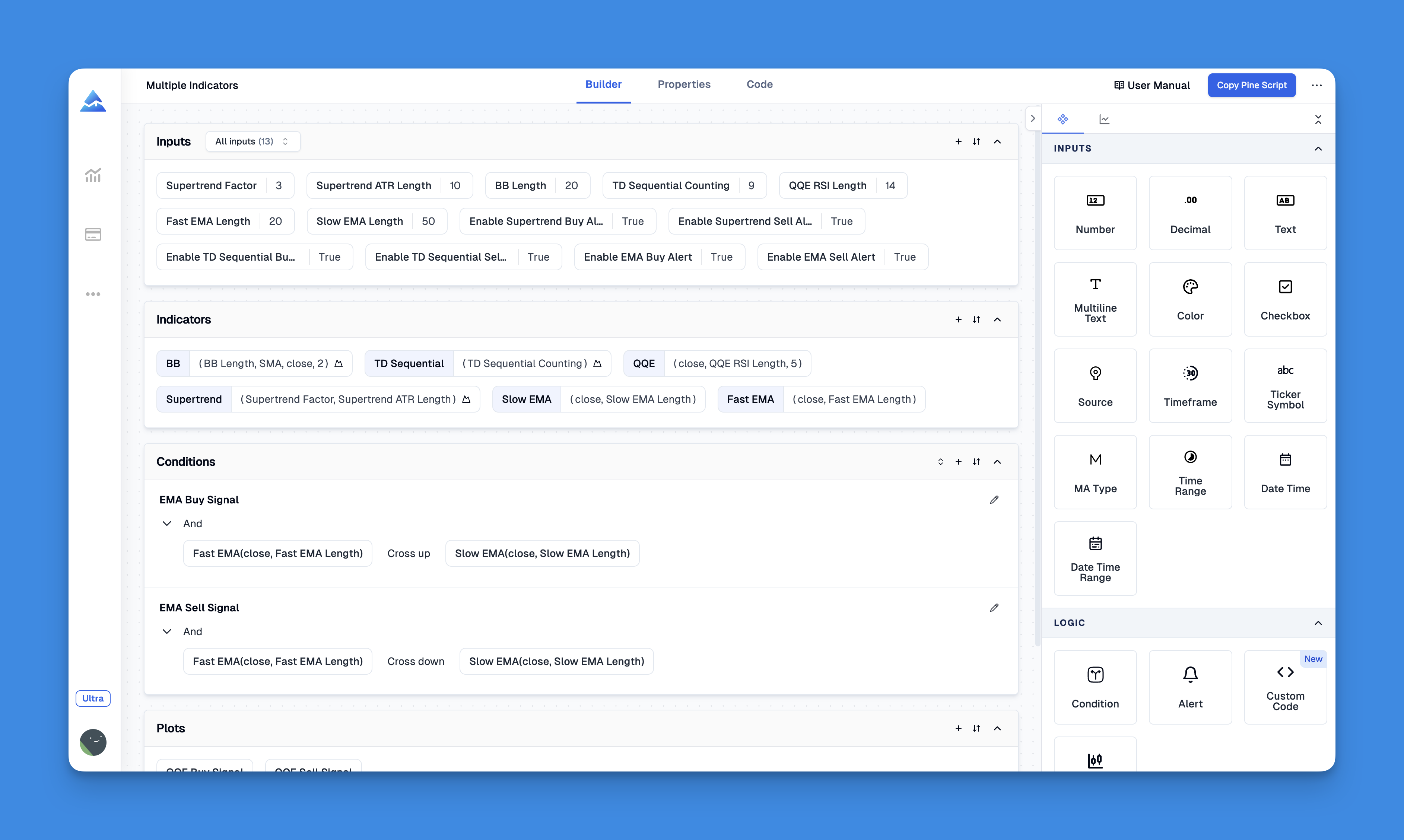
Pineify: The No-Code Solution For traders who want to create sophisticated strategies without learning programming syntax, Pineify offers a visual approach to Pine Script development:

Pineify | Best Pine Script Editor

Website: Pineify

Key Pineify Features:

  • Drag-and-drop interface: Build complex strategies visually without writing code
  • Unlimited indicators: Bypass TradingView's 3-indicator limit on free accounts
  • Advanced condition editor: Combine multiple indicators with logical operators
  • Pine Script v6 output: Generates clean, optimized code that you can customize further
  • Built-in backtesting: Test strategies across different market conditions

Check out all Pineify features for a complete overview of capabilities.

AI-Powered Pine Script Generators

Modern AI tools for Pine Script are revolutionizing how traders create and convert scripts. These tools can help translate strategy descriptions into working code, making conversion between different platforms much easier.

Troubleshooting Common Conversion Issues

Even with automated tools, conversions sometimes fail. Here's how to diagnose and fix the most common problems:

Namespace Resolution Errors

Problem: "Cannot call 'sma' with arguments" or similar function not found errors. Solution: Add the appropriate namespace prefix (ta.sma instead of sma, math.abs instead of abs).

Input Function Incompatibility

Problem: Generic input() functions causing compilation errors. Solution: Update to specific input types: input.bool(), input.int(), input.float(), or input.string().

Type Mismatch Issues

Problem: "Cannot call operator" or type-related errors in v6. Solution: Ensure variables have explicit type declarations and boolean values are properly defined as true or false.

Repainting and Dynamic Request Problems

Problem: Strategies behave differently after conversion or show unrealistic backtesting results. Solution: Review request.security() calls and ensure proper repainting prevention techniques are implemented.

Performance and Compilation Timeouts

Problem: Converted scripts run slowly or timeout during compilation. Solution: Optimize loops, reduce calculation complexity, and consider using built-in functions instead of custom implementations.

Best Practices for Successful Pine Script Conversion

Start Small: Convert simple indicators first to understand the process before tackling complex strategies.

Test Incrementally: After each conversion step, test the script to ensure it still produces expected results.

Maintain Documentation: Keep notes about what changes you made and why, especially for future updates.

Leverage Community Resources: The Pineify Discord community is an excellent resource for getting help with complex conversion challenges.

Consider Professional Help: For critical trading strategies, consider hiring experienced Pine Script developers rather than risking conversion errors.

Final Thoughts on Pine Script Conversion

Converting Pine Script code doesn't have to be overwhelming. The combination of TradingView's built-in converter, modern visual tools like Pineify, and a systematic approach to manual conversion makes the process much more manageable than it was just a few years ago.

Whether you're upgrading legacy indicators to the latest Pine Script version or migrating strategies to Python for advanced algorithmic trading, the key is choosing the right tool for your specific needs. Start with automated solutions when possible, and don't hesitate to invest in modern development tools that can save you countless hours of debugging and testing.

Remember, the Pine Script ecosystem continues evolving, and staying current with the latest versions ensures your strategies can take advantage of new features, improved performance, and better security. The time invested in proper conversion today will pay dividends in more reliable, maintainable trading systems tomorrow.