Post a job on Upwork, wait a week for a quote, pay hundreds of dollars to a freelance MQL4 programmer. That workflow is officially obsolete. A purpose-driven MQL5 coding agent is an AI tool trained specifically on MetaTrader 5's API, indicator patterns, and compilation rules — not a general language model that happens to know some MQL5. It generates, validates, and fixes code until it compiles cleanly. I've used this approach to build an RSI-based EA for EURUSD that ran on the first compile. No back-and-forth with a developer, no surprise revision costs.
Most traders on TradingView check their win rate and net profit and call it done. That's like checking only the mileage on a used car. A Backtest Deep Report is a browser-based tool that takes your TradingView strategy tester CSV and produces professional-grade analytics: over 16 KPIs, Monte Carlo simulations, rolling window analysis, visual heatmaps, and MFE/MAE scatter plots. If you want to trade with confidence, your backtest needs to tell you the deeper story.
Pineify's Backtest Deep Report turns the standard CSV from TradingView's Strategy Tester into a clear, powerful analysis without writing any code. For traders moving strategies between platforms, I've found the MT4 Backtesting Report Interpretation Guide useful for translating across environments.
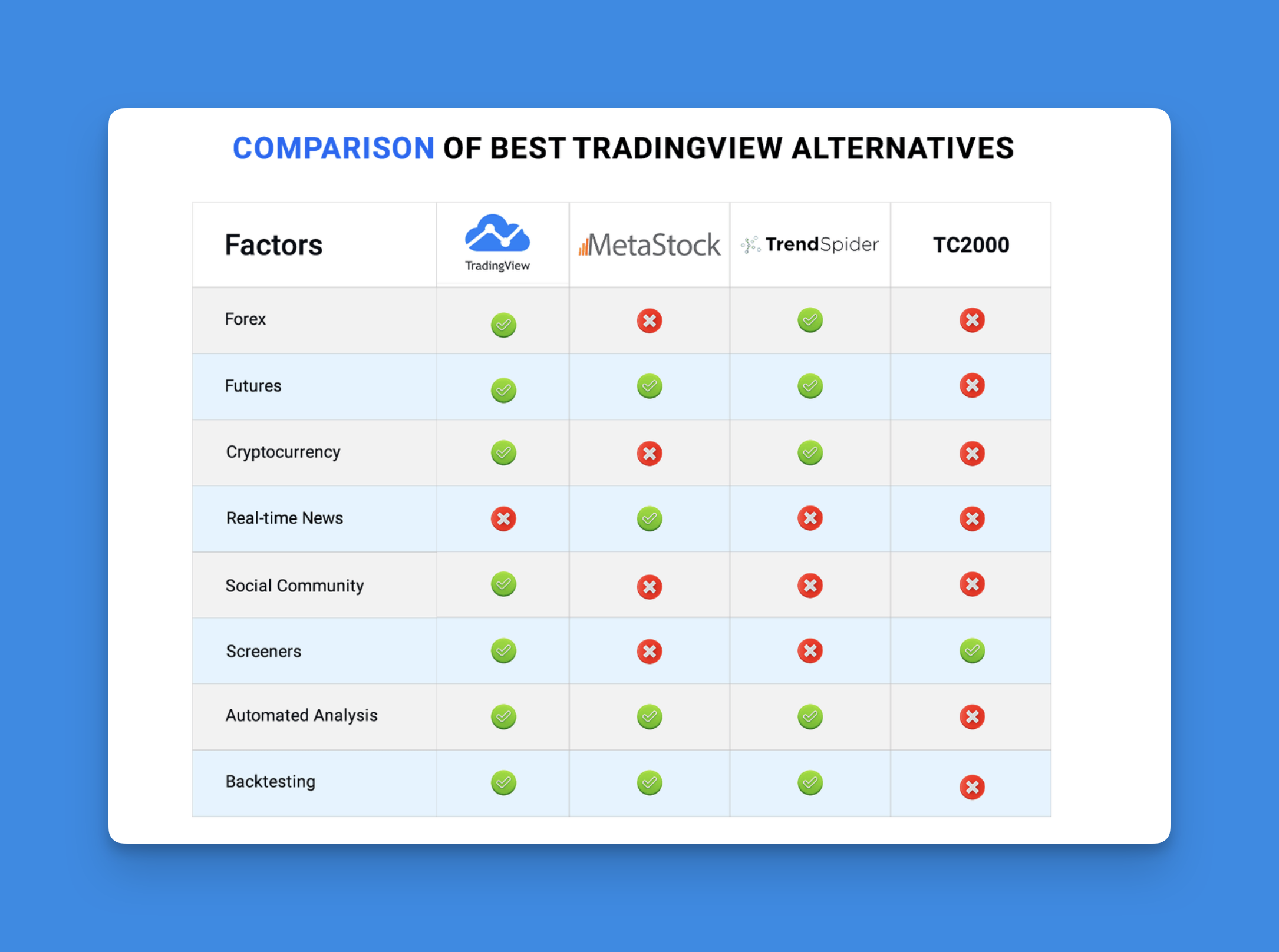
TradingView alternatives are charting and analysis platforms that compete with or complement TradingView's ecosystem. I've tested over a dozen in the past six months, and my verdict is direct: no single platform beats TradingView across the board, but several crush it for specific use cases. If you trade crypto exclusively, you're probably overpaying for features you don't use. If you need real-time AI stock scanning, Trade Ideas will serve you better than Pine Script ever could.
If you're trading with the Godmode Indicator on TradingView but dealing with false signals and messy charts, I've been there too. After testing half a dozen alternatives, Pineify Signals & Overlays is the upgrade I'd recommend — it's an invite-only indicator that checks trend, momentum, and volatility before flashing a signal. Confluence-based signals require multiple confirming factors to align before a trade setup is shown, which filters out the noise that single-oscillator tools struggle with.
The Fisher Transform Strategy is a price-normalization method that reshapes market data into a Gaussian bell-curve form. This makes extreme overbought and oversold conditions pop out before raw price action confirms them. I've run it on SPY daily charts since late 2023, and the indicator regularly flags turning points one to three bars before a reversal candle appears.
An AI trading signal is a buy, sell, or hold recommendation generated automatically by machine learning algorithms. Instead of relying on manual chart reading or fixed rules, these systems analyze live market data, technical indicators, news sentiment, and historical price patterns all at once. The result is a signal based on thousands of data points in milliseconds — giving traders a clearer, more objective way to act.
Ever find yourself copying and pasting the same Pine Script code over and over? Yeah, I've been there too. A for loop in Pine Script is a control structure that repeats a block of code a specific number of times, and it'll save you from that copy-paste madness.
If you're just getting started with Pine Script, you might want to check out our Pine Script Tutorial: A Quick Start Guide for Beginners first. But if you're ready to dive into loops, let's make this as painless as possible.
Pineify AI Stock Picker is a free AI-assisted stock discovery tool that scans a broad stock universe each day and reduces the output to a simple 1-10 ranking score. You start with a prioritized watchlist instead of sorting through charts, filings, and news one stock at a time. I've found this most useful for idea generation and workflow speed — not for skipping the homework on valuation or position sizing.
I've been watching how fast the industry is moving on this. In Mercer's 2024 AI in Investment Management Survey, 54% of investment managers said they already use AI and another 37% plan to, which puts 91% in active or prep mode. For retail traders, tools like Pineify bring some of that institutional filtering into a simpler interface. Last month I ran AAPL and NVDA through the stock picker, and the difference in their scores tracked surprisingly well with their post-earnings reactions — AAPL sat around 7 while NVDA was closer to 4.
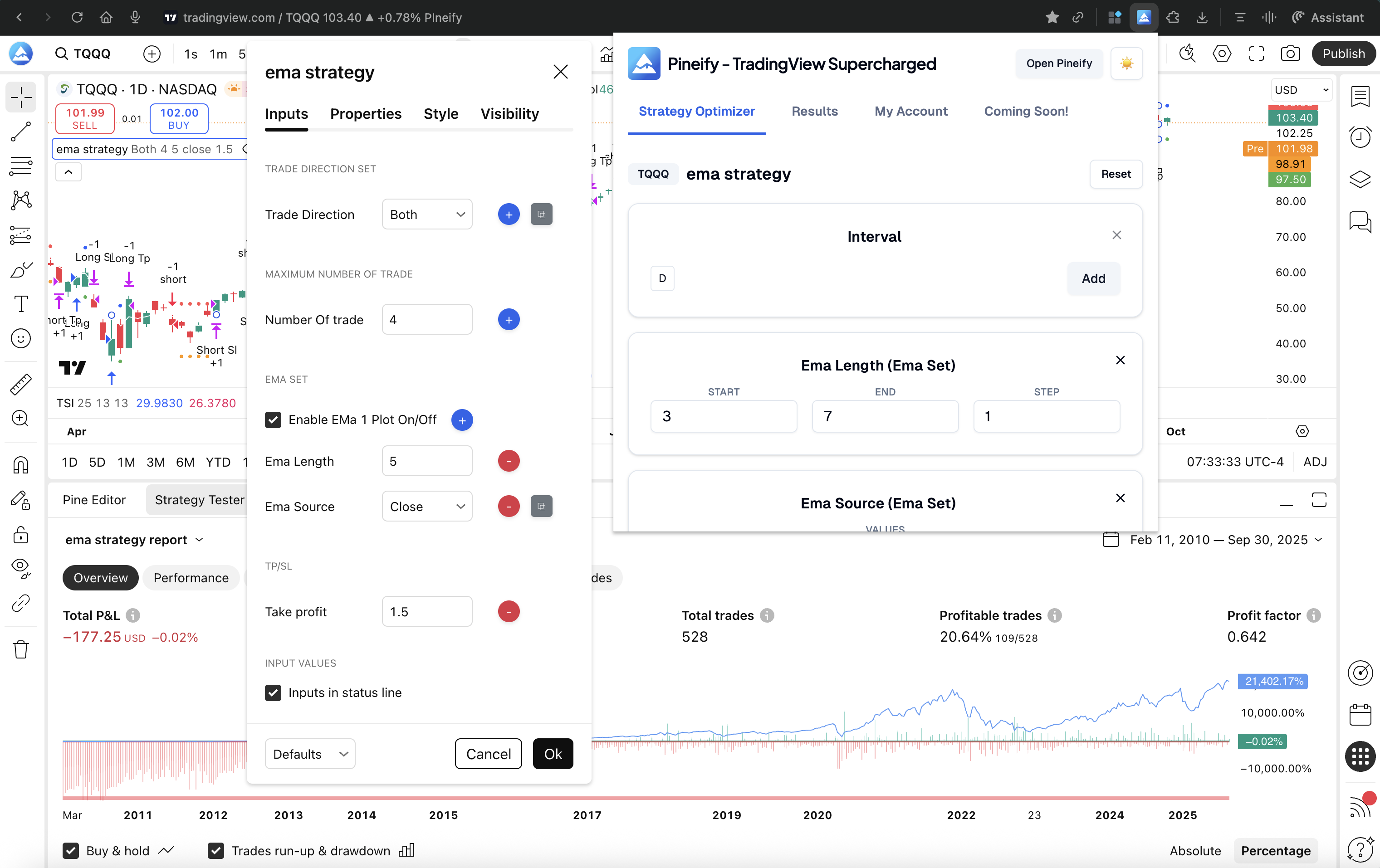
If you've ever lost an afternoon manually testing different RSI levels, tweaking moving average lengths, and adjusting stop-loss percentages—clicking "refresh" over and over—you know the drill. A strategy optimizer automates the search for optimal parameter values in a trading strategy, testing hundreds of combinations without manual intervention. On TradingView, you've got two options: the platform's own built-in strategy tester, and the Pineify Strategy Optimizer—a browser extension that automates the entire process. I've used both for real projects, and my verdict is clear: for serious multi-parameter optimization, Pineify is the better tool. The built-in tester is fine for quick manual checks, but it can't handle systematic grid searches without eating up hours of your time. For those learning the basics, understanding How to Combine Two Indicators in TradingView Pine Script is a good first step before diving into optimization.
Want to test a forex trading idea without risking real money? You should. Free forex backtesting software lets you simulate trades against historical price data before going live. Forex backtesting is the process of replaying a trading strategy against past market data to evaluate its potential performance. It's a reality check before you commit capital.
In my experience, the best free option depends on whether you code. MetaTrader 4's Strategy Tester is the easiest starting point for most beginners—I've tested every tool on this list and MT4 still delivers the best bang for zero dollars. If you prefer manual testing, TradingView's Bar Replay is tough to beat.