

TradingView indicator guide · Standard 5/34 calculation
Awesome Oscillator on TradingView
The Awesome Oscillator (AO) subtracts the 34-bar simple moving average of midpoint price from its 5-bar average. Its position relative to zero and its change from the previous bar answer different questions. Read both before choosing a signal.
Compare zero crosses, twin peaks and saucers below, then use the Pine Script example to inspect confirmed zero crosses on your chart.
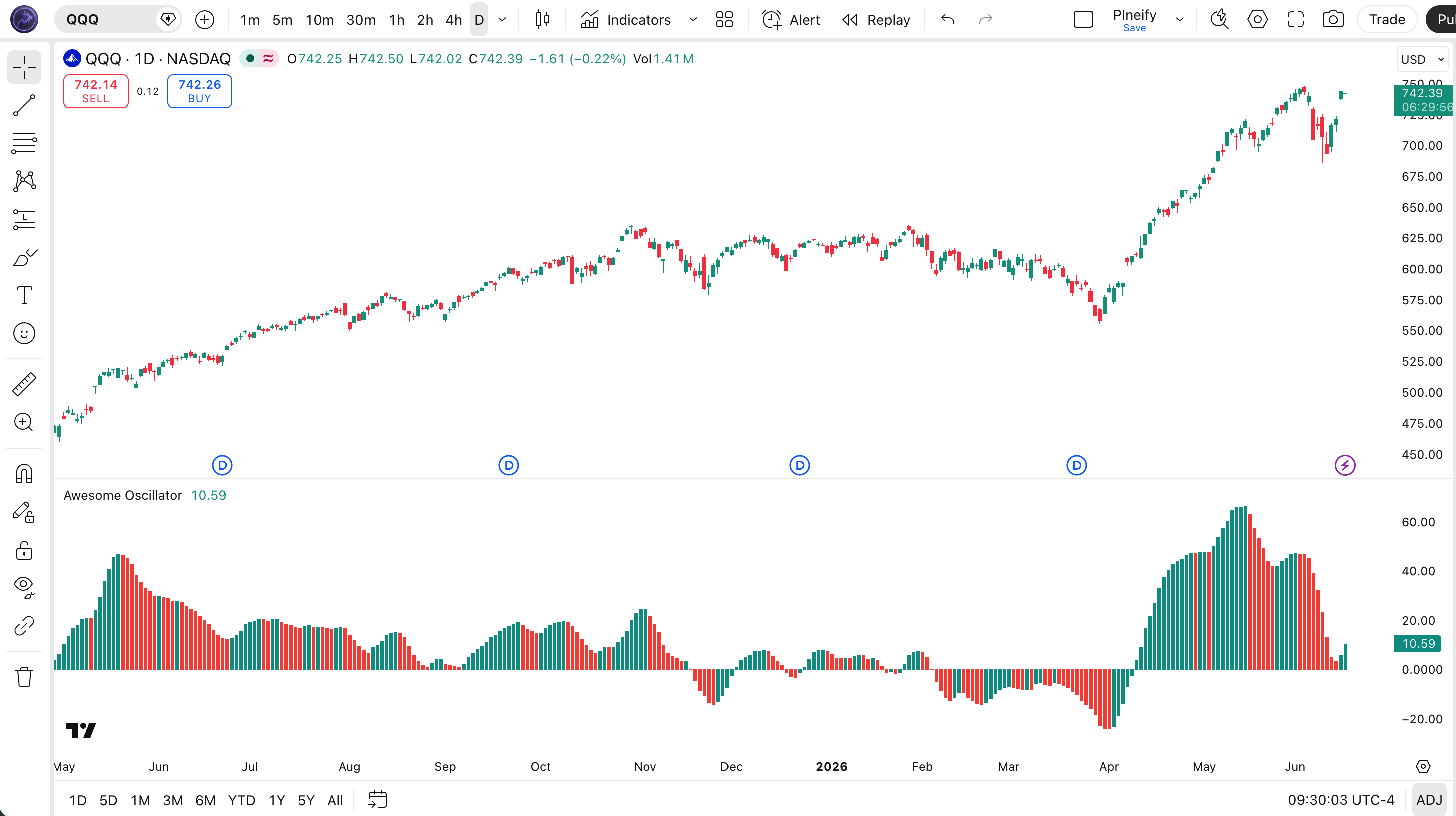
Formula and histogram colors
Midpoint = (High + Low) / 2
AO = SMA(Midpoint, 5) - SMA(Midpoint, 34)
Green means AO increased from the previous bar; red means it decreased. The example below also colors unchanged values red. Above zero, the fast average exceeds the slow average; below zero, it is lower. See the TradingView AO definition.
Illustrative calculation: if the two averages are 102.40 and 101.80, AO is +0.60. If the preceding AO was +0.90, the new bar is red despite remaining positive. A green bar at -0.60 after -0.90 is the opposite case: AO rose but has not crossed zero.
These are price-unit differences. A reading of +2 on one symbol is not directly comparable with +2 on a differently priced symbol, and AO has no fixed overbought or oversold threshold.
Three signals with different conditions
A zero cross changes momentum sign. Twin peaks and saucers form while AO remains on one side. These definitions are consistent with the MetaTrader AO reference and TradingView guide; they do not specify a complete trade.
| Signal | Bullish setup | Bearish setup | What to check |
|---|---|---|---|
| Zero cross | AO moves from zero or below to above zero. | AO moves from zero or above to below zero. | A change of sign. Repeated crossings near zero can reverse again before an entry pays its costs. |
| Twin peaks | Two troughs below zero; the second is shallower and followed by a rising bar. AO stays below zero between them. | Two peaks above zero; the second is lower and followed by a falling bar. AO stays above zero between them. | A turning pattern on one side of zero. Define how peaks are confirmed and reject a setup that crosses zero between them. |
| Saucer | Two falling red bars, then a rising green bar, all above zero. | Two rising green bars, then a falling red bar, all below zero. | A short pullback and turn within the same momentum sign. A color change alone is insufficient. |
Illustrative saucer: AO values +5, +4, +3, +3.5 give two falling bars followed by a rising bar. The first value establishes the color of the +4 bar. By contrast, -5, -4, -3, -3.5 is a bearish saucer. Neither sequence says where to place a stop or when to take profit.
What a trend filter changes
Consider a hypothetical long-only experiment: accept a confirmed bullish zero cross only when the closing price is above its 200-bar EMA. This adds an eligibility condition. It cannot establish that the retained trades will be profitable.
| Closed-bar observation | AO rule only | AO + EMA filter |
|---|---|---|
| AO crosses up; close 101, EMA 100 | Accept | Accept |
| AO crosses up; close 99, EMA 100 | Accept | Reject |
| AO rises below zero; close 101, EMA 100 | Reject | Reject |
The filter rejects the second candidate even if it later becomes a successful reversal. It also keeps the first candidate if price subsequently falls. A rising EMA requirement would be a separate condition; price above an EMA does not imply the EMA itself is rising.
Test the filtered and unfiltered versions with identical entry timing, exits, position sizing, commission and slippage. Compare trade count, average trade after costs and drawdown, then repeat on a separate date range. A higher win rate with a few remaining trades is insufficient evidence of an improvement.
Confirmation has a timing cost
An open candle can change its high and low, so its AO value and color can change too. Waiting for a closed bar removes that intrabar uncertainty for the signal but gives up an earlier provisional entry. TradingView explains this distinction in its repainting documentation.
Twin-peaks automation needs another decision: how is a peak recognized? If your rule requires two bars to the right of a pivot, it becomes known two bars after that pivot. Plotting the marker back on the pivot does not make it tradable then. Record the confirmation bar when testing.
Twin peaks compare AO turns with each other. Price/AO divergence additionally compares price swings, so it needs an explicit pairing rule. Neither a shallower AO trough nor divergence guarantees a price reversal.
Pine Script example: confirmed zero crosses
This indicator plots standard AO and marks zero crosses only after the chart bar closes. It includes alert conditions for those two events. It does not detect saucers or twin peaks, apply the EMA filter, or place strategy orders.
// This source code is subject to the Mozilla Public License 2.0 at https://mozilla.org/MPL/2.0/
// © Pineify
//@version=6
indicator("Awesome Oscillator: confirmed zero crosses", overlay=false)

ao = ta.sma(hl2, 5) - ta.sma(hl2, 34)
rising = ao > ao[1]
crossUp = ta.crossover(ao, 0)
crossDown = ta.crossunder(ao, 0)
confirmedUp = crossUp and barstate.isconfirmed
confirmedDown = crossDown and barstate.isconfirmed

plot(ao, "AO", color=rising ? color.teal : color.red, style=plot.style_columns)
hline(0, "Zero", color=color.gray)
plotshape(confirmedUp, "Confirmed cross up", shape.triangleup, location.bottom, color.teal, size=size.tiny)
plotshape(confirmedDown, "Confirmed cross down", shape.triangledown, location.top, color.red, size=size.tiny)
alertcondition(confirmedUp, "AO cross above zero", "AO crossed above zero on a closed bar.")
alertcondition(confirmedDown, "AO cross below zero", "AO crossed below zero on a closed bar.")
Paste the example into TradingView's Pine Editor and add it to your chart. The histogram still updates during an open bar; confirmation applies to the triangle markers and alert conditions. Create an alert using the corresponding condition and select Once Per Bar Close. See the TradingView alert instructions. Use ordinary candles when comparing the plotted values with the midpoint formula.
Turn one AO rule into a testable script
Pineify's Visual Editor includes AO with the standard 5/34 periods. Its AO output can be used in conditions; its built-in long and short outputs mark changes in the direction of AO. Those outputs alone are not full saucer or twin-peaks detectors.
Use the AI Coding Agent when you need a custom confirmation rule or a complete strategy. Start with a specification such as this illustrative brief, then inspect the generated code:
Use standard 5/34 AO. Compare a long-only zero-cross strategy with and without a close-above-200-EMA filter. Evaluate signals at bar close, enter at the next bar open, exit on a confirmed cross below zero, and allow only one position. Expose commission and slippage assumptions and report trade counts for each version.
This is an experiment specification, not a recommendation or a finished risk plan. Check entry timing, exits and order sizing before relying on a backtest.
Awesome Oscillator questions
Sources and related reading
Official references checked October 16, 2026:
- TradingView: AO formula, colors and signal definitions
- MetaTrader 5: AO signal conditions and invalidation
- TradingView Pine Script: realtime values and pivot confirmation
TradingView indicator guides. Related indicators: MACD, RSI and CCI.
Educational information, not investment advice. Examples are illustrative. Indicator signals and historical tests do not guarantee future results; trading can lose money.