
Pineify AI for technical chart screenshots

AI Stock Analysisfrom One Chart Screenshot

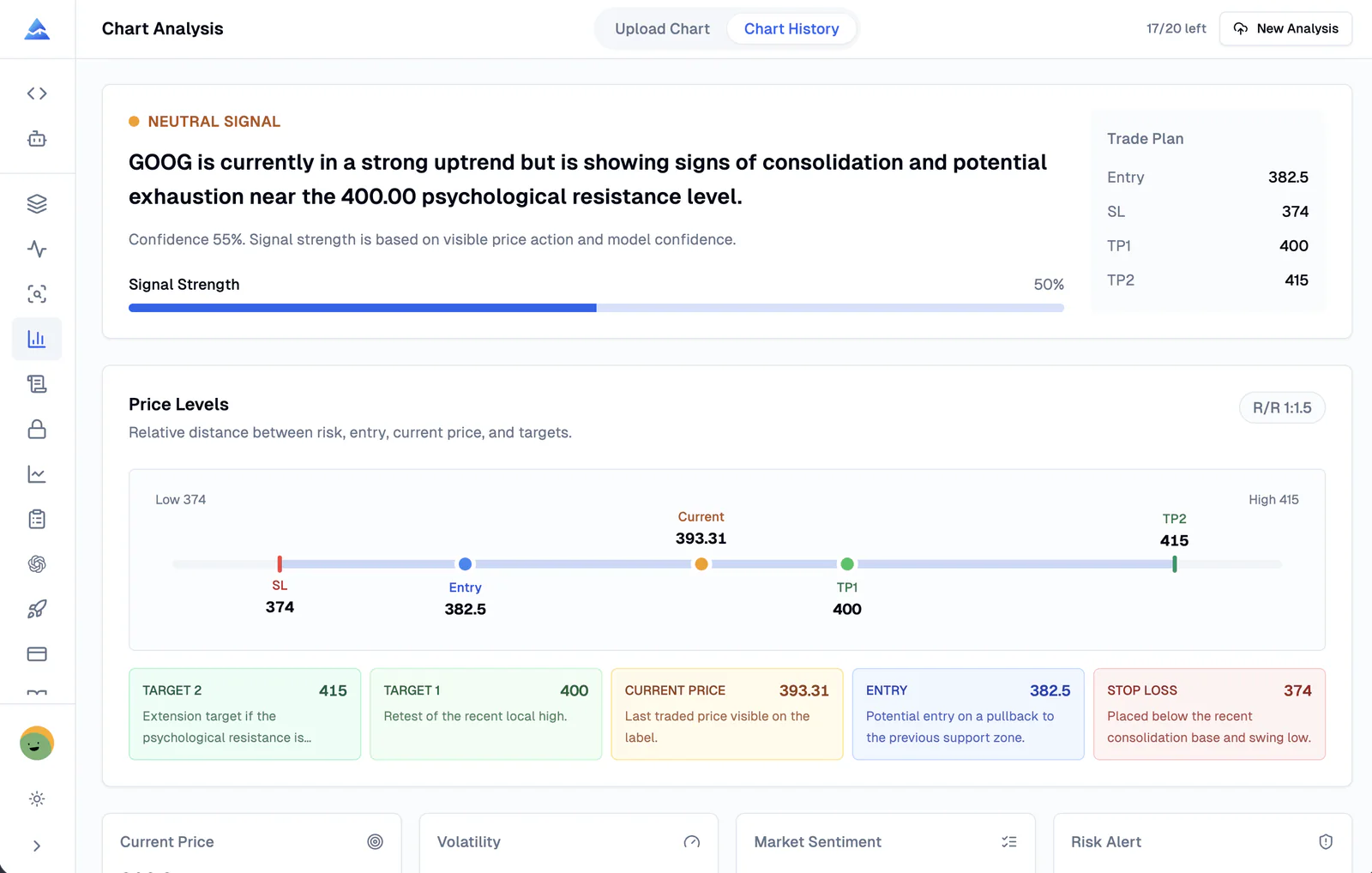
Pineify AI Chart Analysis reads a clean candlestick screenshot and turns it into structured AI Stock Analysis, AI Crypto Analysis, price levels, confidence, and risk context.

Pineify AI Chart Analysis dashboard showing uploaded stock chart analysis results
Image only
No symbol or timeframe form fields
Stocks + crypto
Built for chart-driven market review
Structured output
Levels, confidence, risk, caveats

Precision-focused AI chart reading

Pineify AI turns visual price action into a complete analysis workflow.

Generic chatbots tend to return vague commentary. Pineify structures the output around what traders actually need: directional context, levels, invalidation, trade risk, and the visible evidence behind the setup.

Chart Context Extraction

Reads the visible symbol, timeframe, trend, candle context, support, resistance, and key technical structure from one screenshot.

Price Level Mapping

Turns the chart into current price, entry area, target levels, stop loss, invalidation, and risk/reward context when the setup is clear.

Signal Confidence

Shows directional bias, confidence, volatility, market sentiment, and the reasons behind the AI stock analysis or crypto analysis output.

Risk-First Review

Highlights uncertainty, risk alerts, invalidation conditions, and position-sizing guidance instead of forcing every chart into a trade.

From screenshot to analysis

No optional context. The image is the input.

Upload a chart and Pineify AI handles the extraction. It reads the visible chart information and returns a usable technical analysis format for stocks, ETFs, crypto, and other clean candlestick screenshots.

01

Upload one clean chart screenshot

Use a readable candlestick chart with visible price action. No manual symbol, timeframe, or optional context fields are required.

02

Pineify AI reads the chart

The model extracts visible market context, pattern structure, key price levels, and the likely scenario directly from the image.

03

Review a structured trading plan

Get a concise signal summary, technical rationale, price levels, risk management notes, caveats, and history you can revisit by URL.

AI Chart Analysis result page showing technical analysis, price levels, and uploaded chart screenshot

Built for active traders

Use AI Stock Analysis and AI Crypto Analysis in the same workflow.

Pineify keeps the workflow simple: one chart image in, a structured analysis out. It is designed for repeated chart review, fast setup validation, and disciplined risk checks.

AI Stock Analysis for daily trade review and swing setups

AI Chart Analysis for support, resistance, trend, and candle context

AI Crypto Analysis for BTC, ETH, altcoins, and volatile market screenshots

Trading journal follow-up with outcome tracking for analyzed charts

More than a chart caption

The output includes technical rationale, price levels, market structure, candle context, and risk notes in a repeatable format.

Designed for market screenshots

Use TradingView-style candlestick charts, broker screenshots, or crypto exchange charts as long as the chart is clean and readable.

Fast enough for daily review

Analyze setups quickly, compare history, and revisit a result page later when you want to review the original chart image.

Frequently asked questions

AI Chart Analysis FAQ

Answers for traders comparing AI Stock Analysis, AI Chart Analysis, and AI Crypto Analysis tools.

What is Pineify AI Chart Analysis?

Pineify AI Chart Analysis reads a candlestick chart screenshot and returns structured technical analysis, including symbol, timeframe, trend context, key levels, signal confidence, risk areas, and trade planning context.

Can I use it for AI Stock Analysis?

Yes. Upload a clean stock chart screenshot and Pineify AI identifies visible chart context such as ticker, timeframe, price structure, support, resistance, entry area, target zones, and invalidation levels.

Does it support AI Crypto Analysis?

Yes. The same AI Chart Analysis workflow works for crypto chart screenshots when the chart is readable. It can review BTC, ETH, altcoin, futures, and forex-style candlestick charts based on the visual evidence in the image.

Do I need to type symbol, timeframe, or optional context?

No. The front-end input is only one image. Pineify AI extracts the visible symbol, timeframe, price levels, and setup context directly from the chart screenshot.

Is AI Chart Analysis a financial advisor?

No. Pineify provides research context for traders, not personalized financial advice. Always review the chart, manage risk, and make your own trading decisions.

How is this different from a generic AI chatbot?

Pineify returns a structured trading workflow instead of a loose paragraph: direction, confidence, technical rationale, entry zone, take-profit levels, stop loss, risk/reward, market structure, and follow-up history.

Upload your next chart and let Pineify AI analyze it.

Use Pineify for fast AI Stock Analysis, AI Chart Analysis, and AI Crypto Analysis from the screenshots you already capture.

Buy Once. All Tools. Forever.100,000+ Traders Already Upgraded

One-time payment · No subscriptions · Lifetime updates included

⏰ Lifetime pricing is going away

We're moving to annual subscriptions soon. This is your last chance to lock in a one-time payment and keep every future update at no extra cost.

💡 Once we switch, lifetime access will no longer be available

20% OFF

Plus

$129$99One-time payment
🌟 Advanced Model + 500 AI credits/month — pay once, use forever!
Save 20%
Get Lifetime Access
  • Visual Pine Script Editor
  • Pine Script AI Agent (Knowledge Base, Auto Fix Error & Memory)
  • 500 AI credits monthly
  • Advanced Model (100 msgs / 5h, no credits required)
  • AI Chart Analysis (2 times/day)
  • Exclusive PineifyGPT access
  • 18 premium scripts
  • 🎁 Get 1 month Wundertrading Pro Plan (Reg. $49)
Most Popular Plan
2xUsage

Advanced

$219$149One-time payment
⚡️ 2x AI power — 1000 credits/month + all premium tools included!
🔥 Save 30%
Get Lifetime Access
  • Everything in Plus plan
  • AI Finance Agent
  • Pineify® - Signals & Overlays™ (Invite-only indicator)
  • 1000 AI credits monthly
  • Advanced Model (200 msgs / 5h, no credits required)
  • AI Chart Analysis (5 times/day)
  • Trading Journal
  • Strategy Optimizer Extension
  • Backtest Report Deep Report
  • Lifetime feature updates
🔥Most Powerful Plan🔥
5xUsage

Expert

$369$259One-time payment
⚡️ Full access to every tool + 5x AI power - 2500 credits/month
🔥 Save 30%
Get Lifetime Access
  • Everything in Advanced plan
  • AI Stocks & Options PickerNew
  • Market Insights (Options Flow, Dark Pool, Market Tide & More)New
  • 2500 AI credits monthly
  • Advanced Model (500 msgs / 5h, no credits required)
  • AI Chart Analysis (20 times/day)
  • Priority access to new features
  • Request custom indicators
  • AI Trading AgentComing Soon!
  • more coming soon...
See what's included in each plan
Features
Plus
Advanced
Expert
Pine Script Coding Agent
AI Credits (monthly)
500
1,000
2,500
Advanced Model (no credits needed)
100 msgs / 5h
200 msgs / 5h
500 msgs / 5h
Knowledge Base & Auto Fix Error
AI Products
Exclusive PineifyGPT Access
AI Finance AgentNew
AI Trading AgentSoon
Visual Pine Script Builder
Visual Pine Script Editor
Unlimited Lists & Indicators
Full Technical Analysis Indicators
Multi-timeframe & Multi-symbol
18 Premium Scripts
Trading Tools
Strategy Optimizer Extension
Pineify Signals & Overlays (Invite-only)
Trading Journal
Backtest Report Deep Report
Market InsightsNew
AI Stocks & Options PickerNew
Support & Extras
Wundertrading Pro (1 month, $49 value)
Request Custom Indicators
Priority Access to New Features
Lifetime Feature Updates
Payment Security