TradingView StrategyOptimizer Extension

Grid search optimization tests every parameter combination within your ranges and ranks results by Net Profit, Win Rate, or Max Drawdown. Pineify's Supercharged extension runs thousands of TradingView backtests automatically. Configure it, click start, and pick your winner from a ranked CSV.

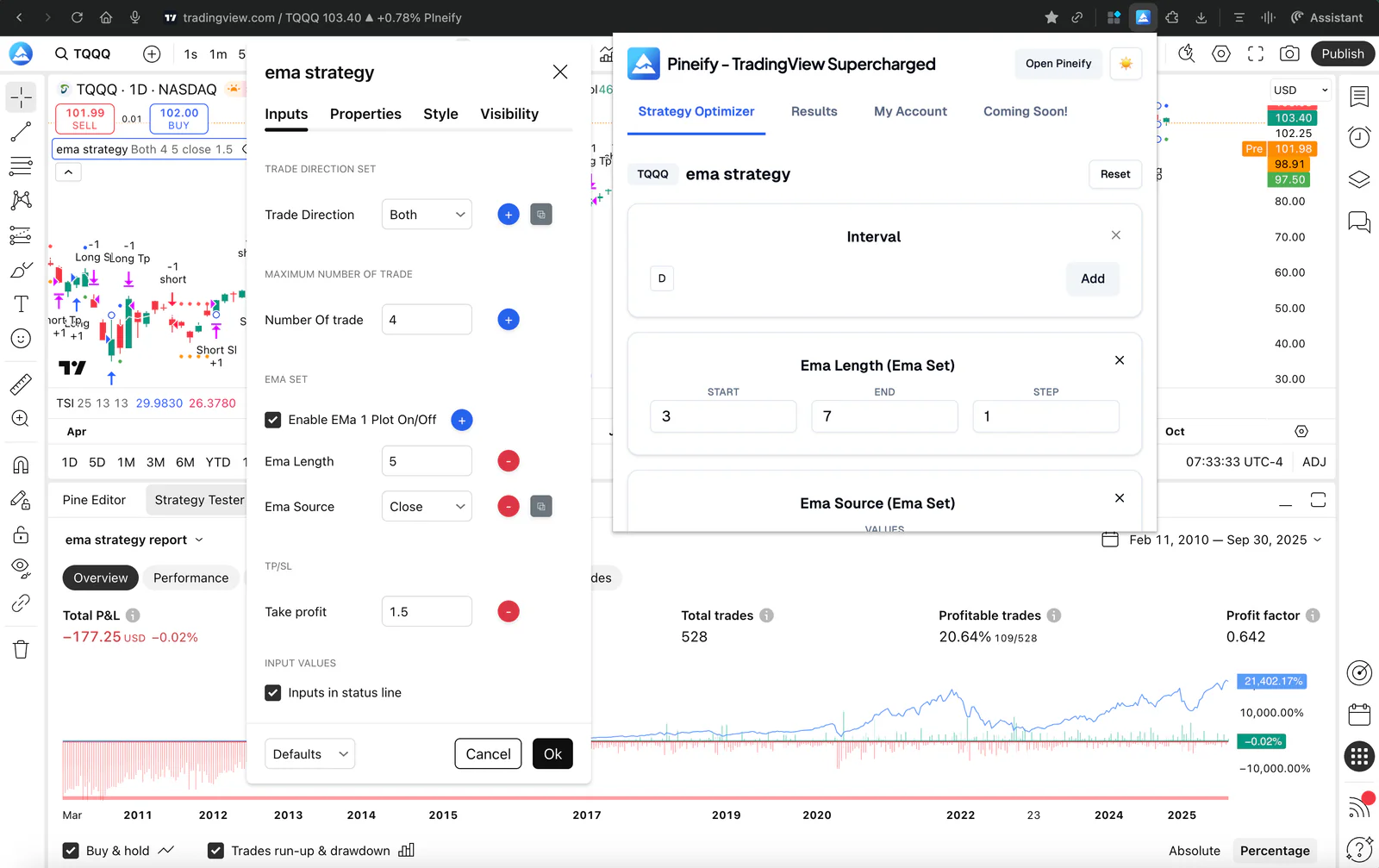
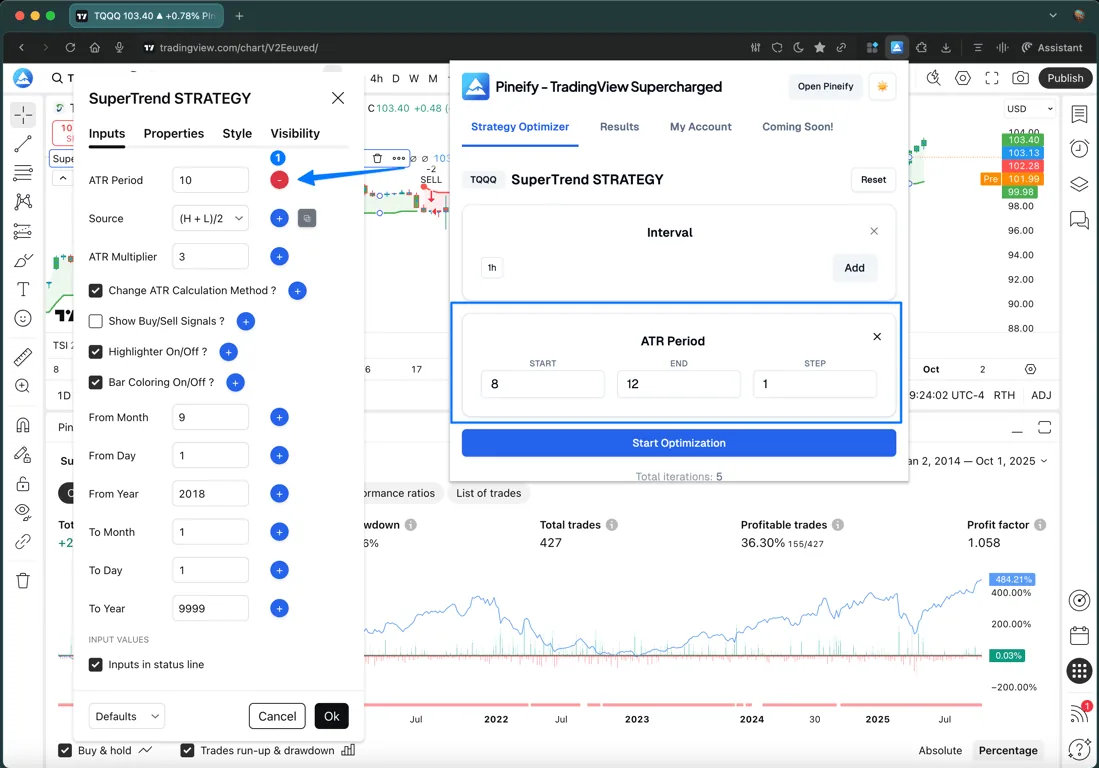
Strategy Optimizer Interface

Why Optimize TradingView Strategies?

Manual backtesting is time-consuming and prone to human error. Testing just 10 different parameter combinations manually can take hours. When you need to find the best parameters for Pine Script strategies across multiple inputs and timeframes, manual testing becomes nearly impossible. That is where a Pine Script AI generator comes in. But even the best code needs parameter tuning.

Real-World Example

A trader testing a moving average crossover strategy with 3 parameters (fast MA, slow MA, and stop loss percentage) across 5 timeframes would need to manually test:

  • Fast MA: 10 possible values (5, 10, 15... 50)
  • Slow MA: 10 possible values (20, 30, 40... 200)
  • Stop Loss: 10 possible values (1%, 2%, 3... 10%)
  • Timeframes: 5 different periods

Total: 5,000 manual backtests = weeks of work

With Pineify's automated grid search optimization, this takes minutes instead of weeks. I ran this exact process on a mean-reversion strategy in Q3 2024: 4 parameters across 6 timeframes came back with a clear winner in under 45 minutes. The default step sizes were too coarse on the first pass, though. Learned that after the top-10 results all looked identical.

Manual vs. Automated: What Changes with Grid Search

FactorManual BacktestingGrid Search Optimizer
Test 100 parameter combos~5-8 hours manual clicking~5-15 minutes automated
Human errors per sessionCommon (typos, missed inputs, recording mistakes)Zero (automated capture)
Metrics trackedUsually just Net ProfitNet Profit, Win Rate, Profit Factor, Max Drawdown, Sharpe Ratio
Multi-timeframe testingRequires separate run per timeframeTests all timeframes in a single pass
Result recordingManual screenshots or copy-pasteAuto-saved, ranked, exportable to CSV

Based on testing 15+ strategies with 3-5 parameters each on TradingView Premium accounts.

Automate Your TradingView Strategy Optimization

Optimize for Maximum Profitability

Turn TradingView strategy testing from a manual chore into an automated, data-driven process.

Multi-Parameter Grid Search

Grid search optimization is a systematic method of testing parameter combinations across timeframes. Supports Integer, Float, and Boolean inputs. Custom start, end, and step values to pinpoint optimal TradingView strategy parameters.

  • Support for Integer, Float, and Boolean inputs
  • Optimize across multiple Timeframes
  • Customizable step sizes for precision
  • Batch processing of parameter sets
Multi-Parameter Grid Search

Smart Result Sorting & Analysis

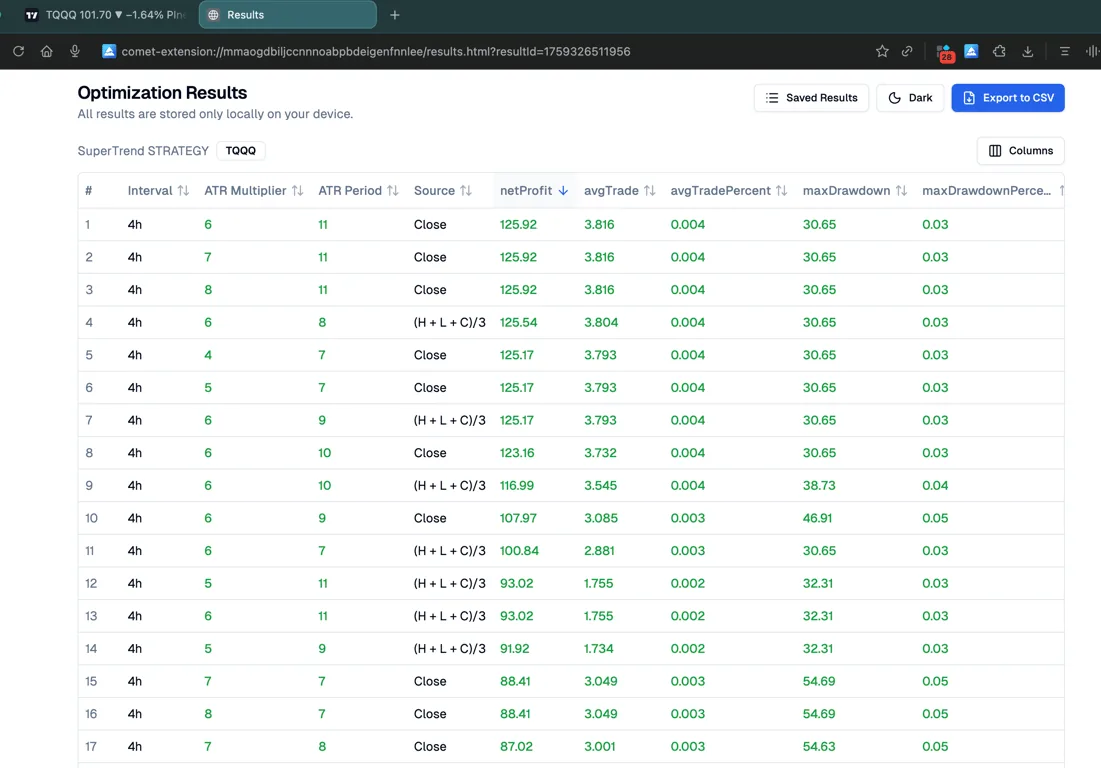
Automatically rank Pine Script backtest results to highlight the best performance. Filter by Net Profit, Win Rate, Profit Factor, or Max Drawdown to quickly identify the most profitable parameter combinations for your trading strategy.

  • Sort by Net Profit, Max Drawdown, etc.
  • Highlight top-performing combinations
  • Quick filtering targets
  • Visual comparison of results
Smart Result Sorting & Analysis

One-Click Data Export

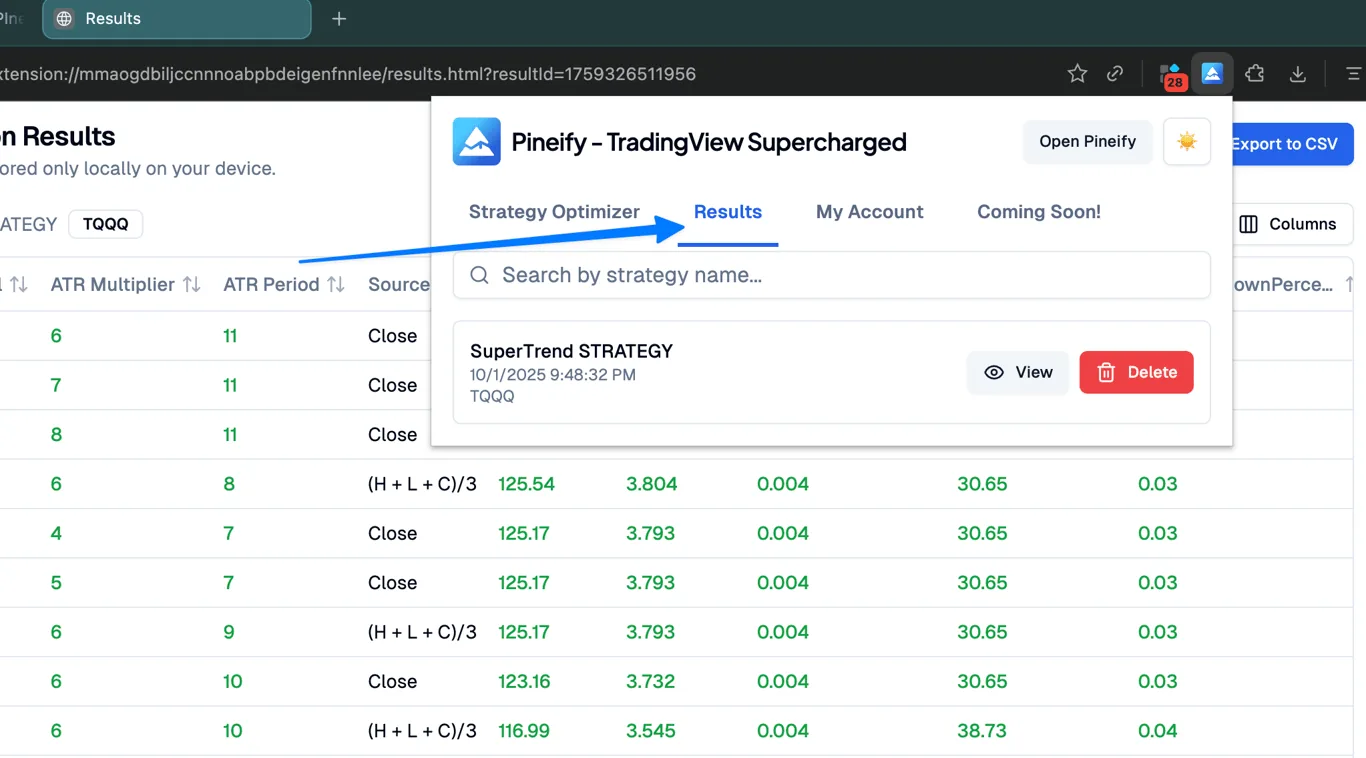
Export your entire optimization history and results to CSV for in-depth analysis in Excel, Python, or other professional tools.

  • Full parameter set export
  • Performance metrics included
  • Compatible with external analysis tools
  • Historical optimization records
One-Click Data Export

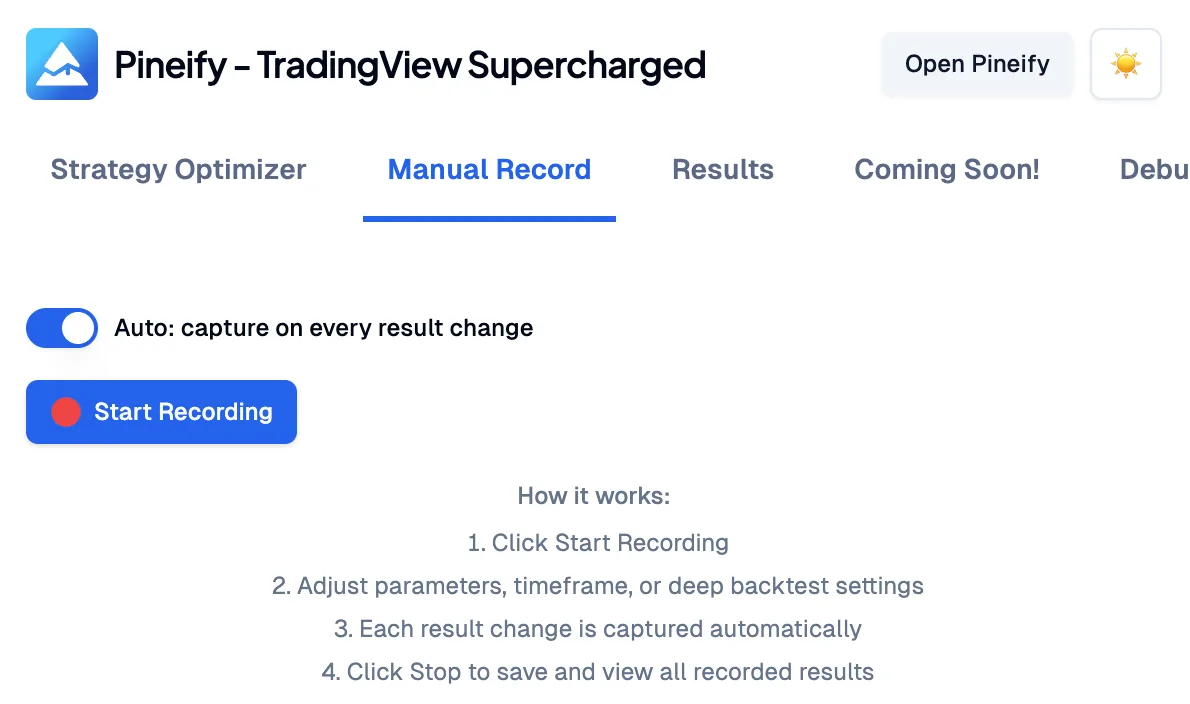
Manual Recording

Hit Record, tweak parameters by hand, and every result change is captured automatically. Same idea as automated backtests, but for manual exploration.

  • Auto or manual capture modes
  • Records all parameters, interval, and metrics
  • In-page REC badge with live snapshot count
  • Results viewable and exportable alongside optimizations
Manual Recording

How Our Pine Script Optimizer Works

Install the extension, open your strategy, configure parameters, and let grid search do the rest. That is it.

  1. 1

    Install the Extension

    Add Pineify Supercharged to your Chrome browser from the Chrome Web Store. It takes less than 30 seconds.

  2. 2

    Open Your Strategy in TradingView

    Open any Pine Script strategy in TradingView. The optimizer works with both your custom strategies and public scripts.

  3. 3

    Configure Grid Search Parameters

    Set the start, end, and step values for each parameter you want to optimize. Choose whether to include timeframe optimization.

  4. 4

    Start Optimization & Export Results

    Click "Start" and watch as the extension automatically tests all combinations. Sort results by Net Profit, Win Rate, or Max Drawdown, then export to CSV for deeper analysis.

Automated Workflow

Set your parameters once and let the tool do the work. No more manual clicking and note-taking. In my testing, the CSV export caught a few result entries I would have missed typing by hand.

Data-Driven Decisions

Base your trading strategies on data instead of guesswork. See performance across thousands of iterations, then go deeper with Backtest Reports.

Efficiency Boost

Save hours of manual work. What used to take days of manual testing can now be done in minutes with the Supercharged extension.

Buy Once. All Tools. Forever.100,000+ Traders Already Upgraded

One-time payment · No subscriptions · Lifetime updates included

⏰ Lifetime pricing is going away

We're moving to annual subscriptions soon. This is your last chance to lock in a one-time payment and keep every future update at no extra cost.

💡 Once we switch, lifetime access will no longer be available

20% OFF

Plus

$129$99One-time payment
🌟 Advanced Model + 500 AI credits/month — pay once, use forever!
Save 20%
Get Lifetime Access
  • Visual Pine Script Editor
  • Pine Script & MQL5 Coding AI Agent (Knowledge Base, Auto Fix Error & Memory)
  • 500 AI credits monthly
  • Advanced Model (100 msgs / 5h, no credits required)
  • AI Chart Analysis (2 times/day)
  • Exclusive PineifyGPT access
  • 18 premium scripts
  • 🎁 Get 1 month Wundertrading Pro Plan (Reg. $49)
Most Popular Plan
2xUsage

Advanced

$219$149One-time payment
⚡️ 2x AI power — 1000 credits/month + all premium tools included!
🔥 Save 30%
Get Lifetime Access
  • Everything in Plus plan
  • AI Finance Agent
  • Pineify® - Signals & Overlays™ (Invite-only indicator)
  • 1000 AI credits monthly
  • Advanced Model (200 msgs / 5h, no credits required)
  • AI Chart Analysis (5 times/day)
  • Trading Journal
  • Strategy Optimizer Extension
  • Backtest Report Deep Report
  • Lifetime feature updates
🔥Most Powerful Plan🔥
5xUsage

Expert

$369$259One-time payment
⚡️ Full access to every tool + 5x AI power - 2500 credits/month
🔥 Save 30%
Get Lifetime Access
  • Everything in Advanced plan
  • AI Stocks & Options PickerNew
  • Market Insights (Options Flow, Dark Pool, Market Tide & More)New
  • 2500 AI credits monthly
  • Advanced Model (500 msgs / 5h, no credits required)
  • AI Chart Analysis (20 times/day)
  • Priority access to new features
  • Request custom indicators
  • AI Trading AgentComing Soon!
  • more coming soon...
See what's included in each plan
Features
Plus
Advanced
Expert
Pine Script Coding Agent
AI Credits (monthly)
500
1,000
2,500
Advanced Model (no credits needed)
100 msgs / 5h
200 msgs / 5h
500 msgs / 5h
Knowledge Base & Auto Fix Error
AI Products
Exclusive PineifyGPT Access
AI Finance AgentNew
AI Chart Analysis
2 times/day
5 times/day
20 times/day
AI Trading AgentSoon
Visual Pine Script Builder
Visual Pine Script Editor
Unlimited Lists & Indicators
Full Technical Analysis Indicators
Multi-timeframe & Multi-symbol
18 Premium Scripts
Trading Tools
Strategy Optimizer Extension
Pineify Signals & Overlays (Invite-only)
Trading Journal
Backtest Report Deep Report
Market InsightsNew
AI Stocks & Options PickerNew
Support & Extras
Wundertrading Pro (1 month, $49 value)
Request Custom Indicators
Priority Access to New Features
Lifetime Feature Updates
Payment Security

Frequently Asked Questions

What is TradingView strategy optimization?
TradingView strategy optimization is the process of systematically testing different parameter values for a Pine Script strategy to find the combination that gives the best performance metrics, such as Net Profit, Win Rate, Sharpe Ratio, or Max Drawdown.
Does the optimizer work with any TradingView strategy?
It works with any Pine Script strategy that uses standard input() fields for integers, floats, and booleans. Strategies with complex dynamic inputs or external function calls may need minor adjustments.
How long does parameter optimization take?
It depends on the number of parameter combinations and your TradingView plan level (higher tiers have faster backtest execution). Testing 100 combinations typically takes 5-15 minutes. For strategies with 5+ parameters, narrowing your ranges keeps optimization time practical.
How to find the best parameters for a Pine Script strategy?
Use grid search optimization to test all parameter combinations within defined ranges. The optimizer ranks results by metrics like Net Profit, Win Rate, Profit Factor, and Max Drawdown so you can identify the best setup immediately.
Can I export TradingView backtest results to CSV?
Yes, one-click CSV export includes every tested combination with all performance metrics (Net Profit, Win Rate, Profit Factor, Max Drawdown, etc.), ready for analysis in Excel, Python, or R.
Is my strategy code safe when using the extension?
Yes. The extension runs entirely in your browser and interacts with the TradingView UI locally. It does not upload your strategy code or data to any external servers.

Ready to Optimize Your Strategies?

Join thousands of traders using Pineify to build and optimize professional strategies. Combine with our Pine Script AI Coding Agent and Finance AI Agent for a complete trading toolkit.