Visual Pine Script EditorBuild TradingView Indicators Without Writing Code

A visual Pine Script editor is a no-code interface for building TradingView indicators, strategies, and screeners by connecting visual blocks instead of typing code. Pick your indicators, set entry and exit rules, and get error-free Pine Script v6 in under a minute. No syntax errors, no debugging sessions.

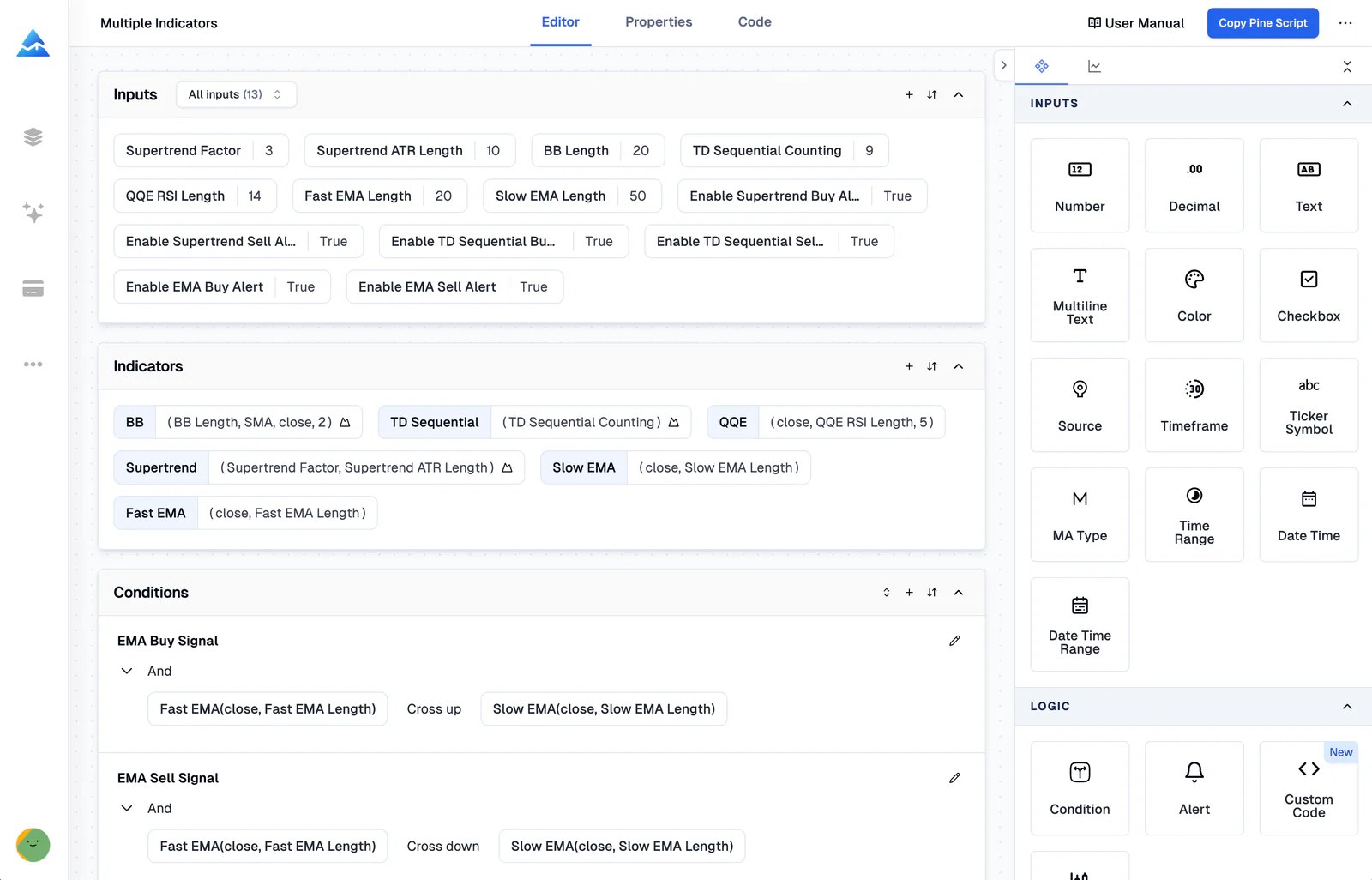
Pineify Visual Editor Interface

How It Works

From idea to TradingView in 3 steps

1

Select Your Indicators

Choose from 235+ built-in technical indicators and candlestick patterns. Combine multiple indicators and set your conditions using the visual interface.

2

Build Your Logic

Define entry and exit rules, stop loss, take profit, and alert conditions visually. No need to remember Pine Script syntax. Just point and click.

3

Export & Backtest

One click generates error-free Pine Script v6 code. Copy it to TradingView, apply it to any chart, and backtest your strategy instantly. I ran a mean-reversion setup through 4,000 bars of NVDA data, and the visual builder output matched my hand-written code bar-for-bar. Use the Backtest Report tool for deeper trade-by-trade analysis.

Complete Visual Toolset

Everything you need to build
without writing code

Visual Indicator Builder

I tested a multi-timeframe RSI-MACD crossover strategy on SPY daily data from 2021 to 2024 with this builder. Hand-coding it would've eaten up half my day. 235+ indicators are ready to combine.

  • 235+ built-in indicators
  • Candlestick pattern recognition
  • Combine multiple indicators
  • Auto-generate error-free Pine Script
Visual Indicator Builder

Visual Strategy Builder

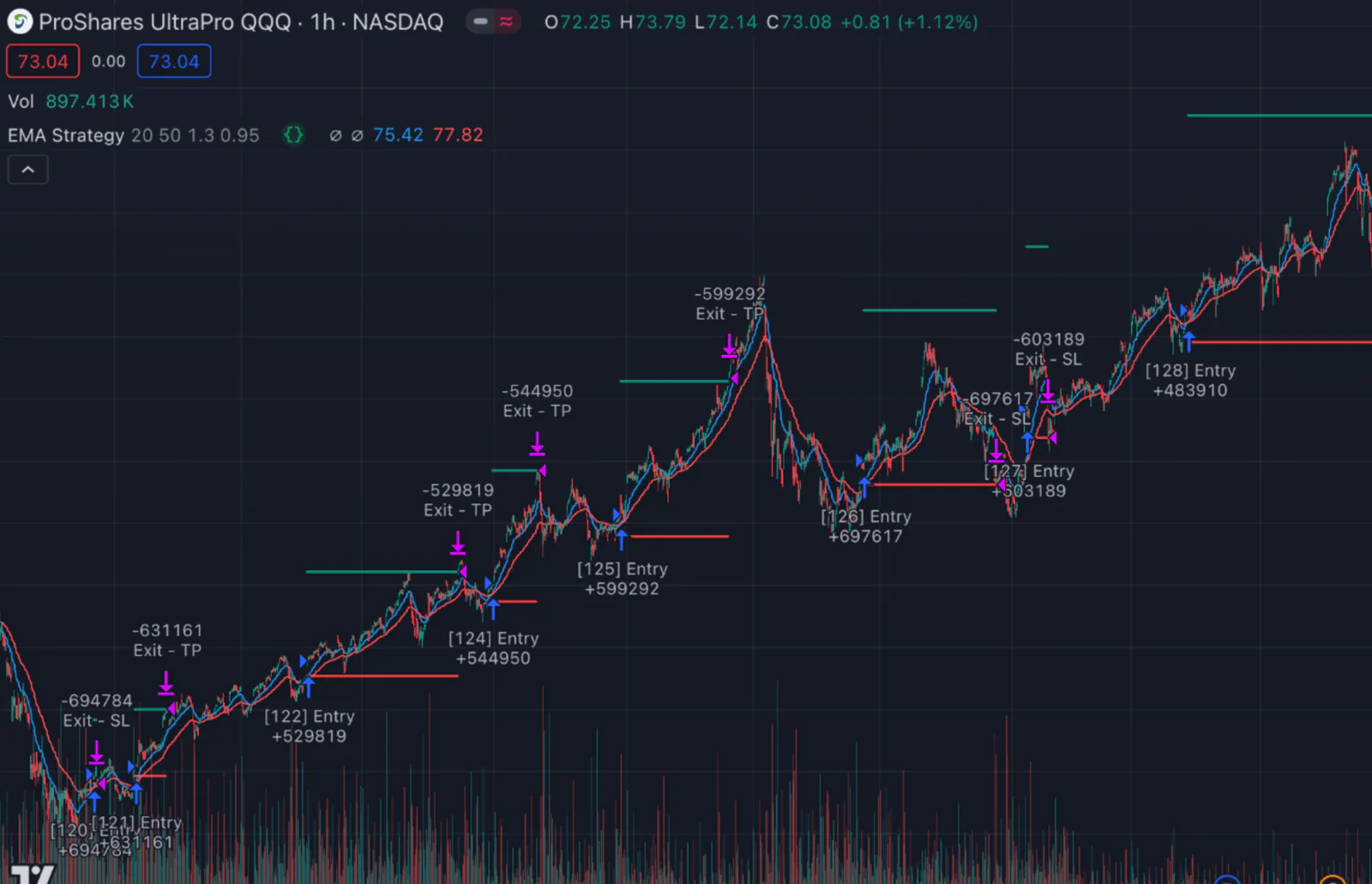
Create automated trading strategies with visual logic blocks. I've been running one on SPY daily since early 2023. The entry signals are solid, though I had to adjust take-profit targets for choppy months.

  • Visual entry & exit rules
  • Stop loss & take profit management
  • Risk management settings
  • Backtest instantly on TradingView
Visual Strategy Builder

Import Custom Code

Insert custom code, and the editor parses signals and variables, making them available for use in the visual builder. I tried importing a custom RSI divergence script and it worked without any manual parsing.

Real-Time Alerts

Set up complex alert conditions visually. Get notified instantly when your strategy triggers. Honestly, the preset templates cover 90% of what most traders need right out of the box.

AI Assistance

Use the Pine Script AI Coding Agent to directly modify your code, explain logic, or optimize parameters instantly.

Why Choose a Visual Editor Over Coding?

Pine Script can do a lot, but its learning curve keeps most traders from building custom indicators and strategies. The visual editor removes that barrier entirely.

Want detailed trade-by-trade analysis after backtesting? Try the Backtest Report tool for deeper metrics.

Visual EditorManual Coding
Learning curveMinutesWeeks to months
Error riskZero, auto-validatedHigh, manual debugging
SpeedBuild in minutesHours to days
Indicator coverage235+ built-inWrite from scratch
Multi-timeframeOne clickComplex code required
MaintenanceAuto-updatedManual updates
Pine Script versionv6, auto-upgradedMust migrate manually

Trusted by 100,000+ Traders

See what traders are saying about the visual Pine Script editor.

“I built a multi-indicator strategy in 15 minutes that would have taken me days to code. The visual editor saved me weeks of learning Pine Script syntax on my own.”

Alex R.

Swing Trader

“Finally I can create custom screeners without learning Pine Script. The 235+ indicators cover everything I need for my technical analysis workflow.”

Maria K.

Day Trader

“The error-free code generation saves me hours of debugging. I export to TradingView and it just works, every single time.”

James T.

Algorithmic Trader

Buy Once. All Tools. Forever.100,000+ Traders Already Upgraded

One-time payment · No subscriptions · Lifetime access

⏰ Lifetime pricing is going away

We're moving to annual subscriptions soon. This is your last chance to lock in a one-time payment for lifetime access.

💡 Once we switch, lifetime access will no longer be available

Plus

$129$99One-time payment
Advanced Model + 500 AI credits/month — pay once, use forever!
Save 20%
Get Lifetime Access

AI usage included

AI credits
500/ month
Advanced Model
100msgs / 5h
AI Chart Analysis
2/ day

Advanced Model messages use no AI credits.

Core tools

  • Coding AI Agent

    Multiple platforms · Knowledge Base, Auto Fix Error & Memory

  • Visual Pine Script Editor
  • Exclusive PineifyGPT access
  • 18 premium scripts

Also included

Best Value Plan
2xUsage

Advanced

$219$149One-time payment
2x AI power — 1000 credits/month + premium trading tools
🔥 Save 30%
Get Lifetime Access

AI usage included

AI credits
1,000/ month
Advanced Model
200msgs / 5h
AI Chart Analysis
5/ day

Advanced Model messages use no AI credits.

Everything in Plus, plus:

Added in Advanced

  • AI Finance Agent
  • AI Stocks & Options PickerNew
  • Strategy Optimizer Extension
  • Backtest Report Deep Report
  • Trading Journal
Maximum AI Power
5xUsage

Expert

$369$259One-time payment
Full access to every tool + 5x AI power — 2500 credits/month
🔥 Save 30%
Get Lifetime Access

AI usage included

AI credits
2,500/ month
Advanced Model
500msgs / 5h
AI Chart Analysis
20/ day

Advanced Model messages use no AI credits.

Everything in Advanced, plus:

Added in Expert

  • Market InsightsHot

    Options Flow, Opportunities, Dark Pool, Market Tide & more

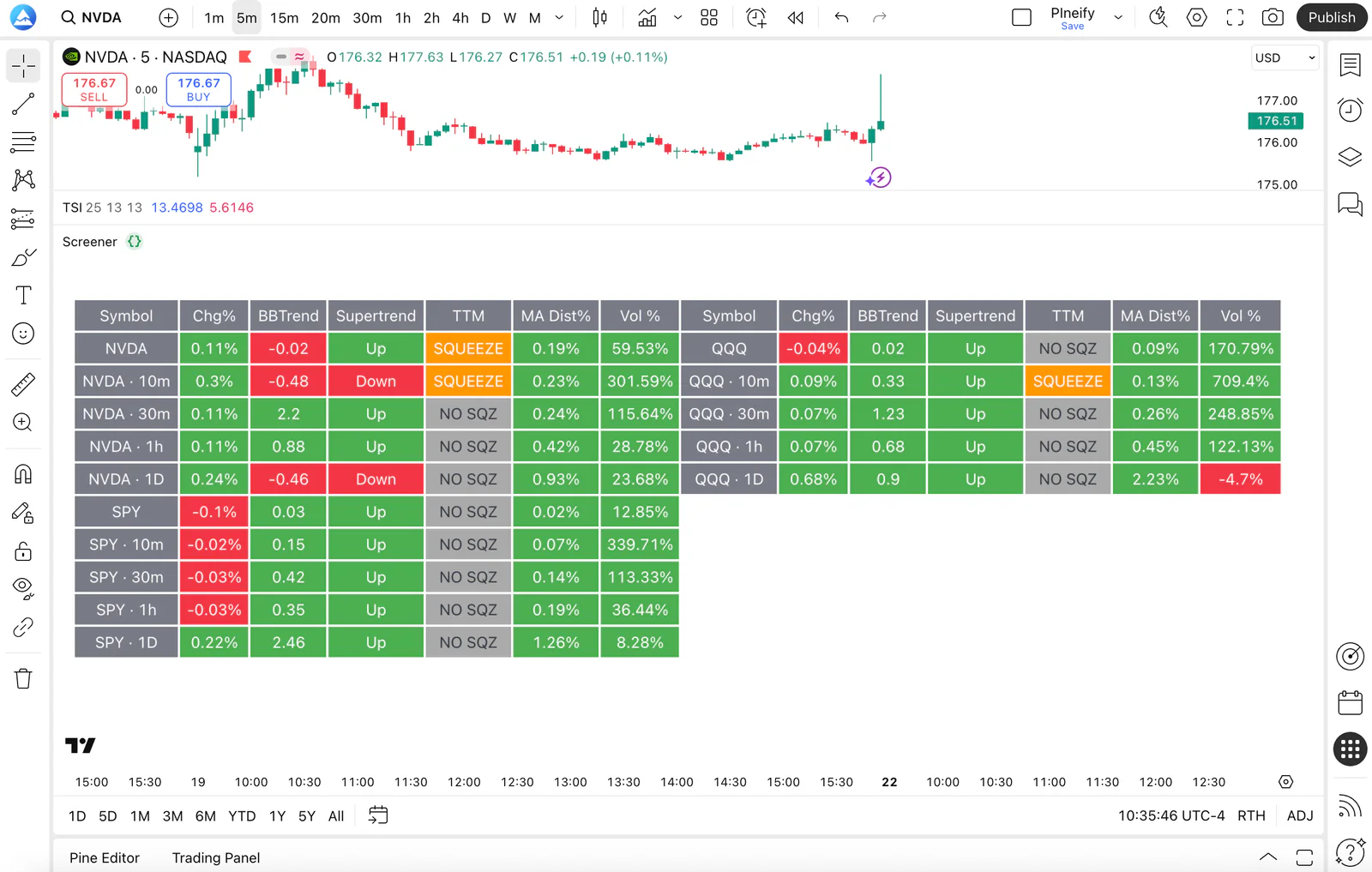
  • Market ScreenerNew
  • Analyst RatingsNew
  • MCP Access for AI Agents
  • AI Trading Agent
  • AI Daily Portfolio Report
  • Access Mobile App

Also included

  • Request custom indicators
  • Priority access to new features
  • Lifetime feature updates
See what's included in each plan
Payment Security

Frequently Asked Questions

What is Visual Pine Script Editor?
Visual Pine Script Editor is a no-code interface for building TradingView indicators, strategies, and screeners by connecting visual blocks. It generates error-free Pine Script v6 automatically, with no programming knowledge required.
How many indicators are supported?
The Visual Pine Script Editor supports 235+ technical indicators including all TradingView built-ins and popular community indicators, plus candlestick pattern recognition.
Do I need any programming knowledge?
No. The Visual Editor is designed for non-coders. You connect visual blocks to build logic, and Pineify generates error-free Pine Script v6 automatically. New users typically go from zero to a working strategy in under 30 minutes.
Can I use the generated code on TradingView?
Yes. All generated code is standard Pine Script v5/v6 that runs directly on TradingView, covering indicators, strategies, and screeners. No modifications needed.
Can I backtest my strategies?
Yes. The visual editor outputs strategy code compatible with TradingView Strategy Tester. Backtest across multiple timeframes and symbols instantly.
What's the difference between the visual editor and Pine Script coding?
The visual editor builds trading logic through point-and-click menus and visual blocks. Pine Script coding requires typing syntax manually. Both produce the same Pine Script v6 output, but the visual editor cuts development time by roughly 80% and removes syntax errors entirely. That said, if you need highly custom logic that the visual blocks cannot express, hand-coding still gives you more flexibility.
Can I import my existing Pine Script code?
Yes. Insert your existing Pine Script code and the editor parses its signals and variables, making them available alongside built-in indicators in the visual builder. This works with most Pine Script v5 and v6 scripts.
Is it free to use?
The free version lets you explore the builder with limited features. Advanced features like full indicator access, strategy building, and code export require a one-time payment, with no subscriptions. The free tier is useful for testing, but power users will want at least the Plus plan for daily use.

Ready to Automate Your Trading?

Join thousands of traders using Pineify to build professional indicators and strategies without writing a single line of code.