

Volume Oscillator on TradingView: formula and limits
The Volume Oscillator compares a fast average of volume with a slow average. A positive value means the fast average is higher. It measures a change in trading activity; price direction is absent from the calculation.
Difference = Fast volume MA − Slow volume MA
Percent = 100 × Difference / Slow volume MA
This guide covers the two-average definition. TFS Volume Oscillator signs volume by candle direction and is a separate algorithm. The earlier TFS example on this URL has been replaced.
Choose the scale before comparing values
A raw difference keeps the units supplied by the chart feed. A percentage divides by the slow average, so a value of 20 means that the fast average is 20% above the slow average. It is neither a 20% price return nor a share of buying volume.
| Output | Fast 200, slow 150 | Constraint |
|---|---|---|
| Difference | 50 volume units | Magnitude depends on feed units and activity. |
| Percent | 33.33% | Requires a positive slow average. |
| Percent with fast denominator | 25% | Different formula; do not compare as identical. |
TradingView documents the slow-average denominator for PVO. Its full PVO also adds a signal line and a histogram equal to PVO minus that signal. The bars in our code show the oscillator itself, without that extra subtraction. See the PVO guide for the separate three-series structure.
A volume spike can change the sign after it has passed
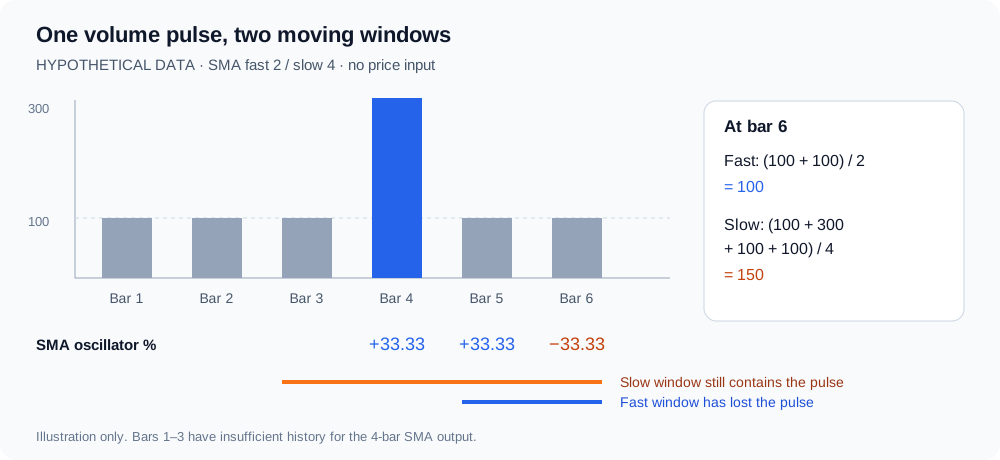
Use these six hypothetical bars in order: 100, 100, 100, 300, 100, 100. Set fast length to 2 and slow length to 4. For SMA, average the latest 2 or 4 observations. For EMA, seed both averages at the first observation, 100, and use α = 2 / (length + 1).
| Bar | Volume | Fast SMA | Slow SMA | SMA diff. | SMA % | EMA % |
|---|---|---|---|---|---|---|
| 4 | 300 | 200.00 | 150.00 | 50.00 | 33.33% | 29.63% |
| 5 | 100 | 200.00 | 150.00 | 50.00 | 33.33% | −2.40% |
| 6 | 100 | 100.00 | 150.00 | −50.00 | −33.33% | −10.86% |
At bar 4, the SMA values are (100 + 300) / 2 = 200 and (100 + 100 + 100 + 300) / 4 = 150. At bar 6, the spike has left the fast window but remains in the slow window. The resulting −33.33% occurs even though bars 5 and 6 have identical volume. No price movement or selling pressure was needed to create that negative reading.
EMA follows a different path: at bar 4, fast = 233.3333 and slow = 180; at bar 5, fast = 144.4444 and slow = 148. Its percentage has already turned negative. SMA removes an observation at a fixed window boundary; EMA decays its influence recursively. Different lengths, seeds or smoothing methods can therefore change the crossing bar.
Complete Pine Script v6: inspect both averages
Paste this standalone educational indicator into Pine Editor and add it to your chart. It supports EMA or SMA, raw or percent output, a status message and confirmed zero-crossing alerts. The Data Window exposes both averages and both output scales. This is a custom example, not a claim that the Pineify visual editor has a matching module.
//@version=6
indicator("Volume Oscillator: auditable averages", overlay=false, precision=2)

fastLength = input.int(5, "Fast length", minval=1, maxval=500)
slowLength = input.int(10, "Slow length", minval=2, maxval=500)
maType = input.string("EMA", "Average type", options=["EMA", "SMA"])
outputMode = input.string("Percent", "Output", options=["Percent", "Difference"])
confirmedOnly = input.bool(true, "Show only closed bars")

if fastLength >= slowLength
    runtime.error("Fast length must be less than slow length.")

// Explicit EMA seed: first valid volume. A missing bar resets the state.
resetEma(float source, int length) =>
    float alpha = 2.0 / (length + 1)
    var float average = na
    average := na(source) ? na : na(average[1]) ? source : alpha * source + (1 - alpha) * average[1]
    average

validVolume = not na(volume) and volume >= 0
sourceVolume = validVolume ? volume : na
var int validRun = 0
validRun := validVolume ? validRun + 1 : 0
fastEma = resetEma(sourceVolume, fastLength)
slowEma = resetEma(sourceVolume, slowLength)
fastSma = ta.sma(sourceVolume, fastLength)
slowSma = ta.sma(sourceVolume, slowLength)
fastAverage = maType == "EMA" ? fastEma : fastSma
slowAverage = maType == "EMA" ? slowEma : slowSma
ready = validRun >= slowLength
rawDifference = ready ? fastAverage - slowAverage : na
percentDifference = ready and slowAverage > 0 ? 100 * rawDifference / slowAverage : na
oscillator = outputMode == "Percent" ? percentDifference : rawDifference
showBar = not confirmedOnly or barstate.isconfirmed

plot(showBar ? oscillator : na, "VO (selected units)", color=oscillator >= 0 ? color.blue : color.orange, style=plot.style_histogram, linewidth=2)
hline(0, "Zero", color=color.gray)
plot(showBar and ready ? fastAverage : na, "Fast volume average", display=display.data_window)
plot(showBar and ready ? slowAverage : na, "Slow volume average", display=display.data_window)
plot(showBar ? rawDifference : na, "Difference (volume units)", display=display.data_window)
plot(showBar ? percentDifference : na, "Difference (%)", display=display.data_window)

crossUp = ta.crossover(oscillator, 0)
crossDown = ta.crossunder(oscillator, 0)
alertcondition(barstate.isconfirmed and crossUp, "VO above zero", "Fast volume average crossed above slow volume average at close.")
alertcondition(barstate.isconfirmed and crossDown, "VO below zero", "Fast volume average crossed below slow volume average at close.")

var table status = table.new(position.top_right, 1, 1)
if barstate.islast
    string message = not validVolume ? "Volume missing or invalid" : not ready ? "Waiting for consecutive volume bars" : outputMode == "Percent" and slowAverage == 0 ? "Percent undefined: slow average is zero" : not showBar ? "Waiting for bar close" : outputMode == "Percent" ? "VO unit: percent" : "VO unit: supplied volume"
    table.cell(status, 0, 0, message, text_color=color.white, bgcolor=color.new(color.black, 20))
Implementation policy: require slow-length consecutive valid bars before output. Missing or negative volume resets the EMA seed and the valid-bar count; zero volume is valid. EMA starts from the first valid volume after a reset. This deliberate policy may differ from the gap handling of another script or initialization.
Inputs and failure states to check
| Setting or condition | Behavior in this example |
|---|---|
| Fast 5, slow 10; EMA | Demonstration defaults, measured in chart bars. Fast must be smaller than slow; otherwise the script reports an error. |
| Show only closed bars: on | The current open bar remains blank until its closing update. Alerts always require bar close, even with live plotting enabled. |
| No volume or an isolated missing bar | Output is unavailable. Require a new consecutive valid run; do not replace missing data with zero. |
| Four zero bars with SMA 2/4 | Both averages are zero. Difference is 0; percent is undefined and stays blank, rather than displaying a fabricated 0%. |
| Tiny positive slow average | The percentage can be large. Inspect the underlying averages before applying a threshold. |
| Tick volume or different providers | Readings describe the supplied series. Price-update counts and traded shares are different inputs; percent normalization does not make the feeds equivalent. |
How to use the Volume Oscillator indicator on TradingView
- Choose the exact exchange or data provider, symbol, chart timeframe and session. Confirm that Volume has usable data. A missing feed cannot be repaired by an oscillator.
- Set the same lengths and average type in both scripts being compared. Match the denominator and determine whether a histogram shows the main oscillator or main minus signal.
- Select a closed bar and inspect fast average, slow average, raw difference and percent in the Data Window. Recalculate one bar before comparing crossings.
- Inspect an isolated volume spike, a quiet interval and a session transition. A crossing can come from old volume leaving a window; keep price evidence separate.
- If you later build a strategy, specify entries, exits, sizing and transaction costs separately. Validate calculations first, then evaluate the trading rules.
The code runs on the chart timeframe and does not request another timeframe. Bar-close confirmation removes the unfinished-bar value from this display; it does not guarantee identical results after a data-provider revision. Educational material, not investment advice.
Volume Oscillator questions
Sources and related calculations
Official references checked October 17, 2026. Tables and the pulse diagram are original hypothetical calculations.
- TradingView: Percentage Volume Oscillator
- TradingView: Exponential Moving Average
- TradingView: missing, zero and tick volume
- Pine Script documentation: bar states
For a different input construction, see OBV Oscillator. Return to TradingView indicator guides for the category overview.
Specify the calculation before asking for code
Use Pine Script AI Coding Agent to describe or adapt your version. Include the two lengths, SMA or EMA, output units, the slow-average denominator, missing-data policy and confirmation time. Ask for both averages in the Data Window so you can compare each bar.
Example request: "Adapt the supplied Volume Oscillator to SMA 2/4, show percent, leave undefined values blank, and alert only on confirmed crossings. Keep the diagnostic averages." Review the generated source and chart values before relying on alerts.
Open Pine Script AI Coding Agent