

QQE indicator: RSI smoothing and trailing bands
The QQE indicator (Quantitative Qualitative Estimation) pairs a smoothed RSI with a trailing line built from changes in that RSI. Crosses describe momentum shifts; they can repeat in a sideways market. This guide follows Pineify's base QQE calculation with RSI length 14, smoothing 5, and a 4.236 band multiplier.
Educational example, not investment advice. The calculations below do not establish a profitable trading strategy.
From RSI to a dynamic band distance
Let n be RSI length, s be the EMA smoothing length, and [1] mean the previous bar. The base routine below applies two recursive smoothing passes to absolute changes in the fast line. Calling this an "ATR of RSI" does not make it TradingView's price-based ta.atr().
| Stage | Calculation | Interpretation |
|---|---|---|
| RSI | R = RSI(source, n) | Default source: close; n = 14. |
| Fast line | F = EMA(R, s) | Default s = 5. Values remain on the RSI scale. |
| RSI movement | D = abs(F - F[1]) | A one-bar absolute change, not price true range. |
| First smoothing | A = D / n + (1 - 1 / n) × A[1] | The example substitutes zero for a missing prior A. |
| Second smoothing | B = A / n + (1 - 1 / n) × B[1] | The example substitutes zero for a missing prior B. |
| Candidate bands | W = 4.236 × B; U = F + W; L = F - W | W is an RSI-point distance, not a price stop. |
For n = 14, each volatility pass uses a coefficient of 1/14. An EMA of length 27 has that same coefficient, since 2/(27 + 1) = 1/14, but initialization can differ. The displayed routine uses zero for missing prior recursive values; replacing it with a differently seeded average can change early bars. Compare versions after a sufficient warm-up and with the same available history.
glaz's QQE MT4 description identifies a smoothed RSI and a Wilder-smoothed trailing line with factor 4.236. The exact recurrence on this page is the Pineify base routine printed below. The multiplier sets distance; it does not imply a measured probability or a Fibonacci price target.
The slow line keeps state between bars
The slow line T is not simply today's upper or lower band. This implementation checks the following conditions in order and uses the first match. Strict inequalities are part of the rule; equality alone does not reset a band.
| Priority | Condition | Result | Meaning |
|---|---|---|---|
| 1 | U < T[1] | T = U | Lower the trailing line. |
| 2 | F > T[1] and F[1] < T[1] | T = L | Reset below fast after an upward crossing. |
| 3 | L > T[1] | T = L | Raise the trailing line. |
| 4 | F < T[1] and F[1] > T[1] | T = U | Reset above fast after a downward crossing. |
| 5 | None of the above | T = T[1] | Keep the previous trailing value. |
A four-bar calculation you can check
Start with hypothetical prior values F = 48, T = 50, A = 0.5, B = 0.5, and n = 14. Feed the next fast-line values 52, 55, 54, and 52 into the recurrence. These are illustrative oscillator inputs, not an observed market or a backtest. Values are rounded to four decimals after calculation.
| Bar | F | A | B | W | T | State update |
|---|---|---|---|---|---|---|
| 1 | 52 | 0.7500 | 0.5179 | 2.1936 | 49.8064 | Upward reset |
| 2 | 55 | 0.9107 | 0.5459 | 2.3125 | 52.6875 | Raise lower band |
| 3 | 54 | 0.9171 | 0.5724 | 2.4248 | 52.6875 | Hold previous value |
| 4 | 52 | 0.9944 | 0.6026 | 2.5525 | 54.5525 | Downward reset |
On bar 1, D = |52 - 48| = 4, A = 4/14 + 13 × 0.5/14 = 0.75, and B = 0.75/14 + 13 × 0.5/14 = 0.517857. The upward reset places T at 52 - 4.236 × B = 49.806357. On bar 3, the new lower candidate is 51.5752, so T holds at 52.6875. Bar 4 crosses below that prior T and resets T to the upper candidate, 54.5525.
The last fast value is still above 50, yet it crosses below the slow line. A 50-level filter and a fast/slow cross answer different questions. Neither establishes the direction of the next price bar.
QQE Pine Script v6 with confirmed alerts
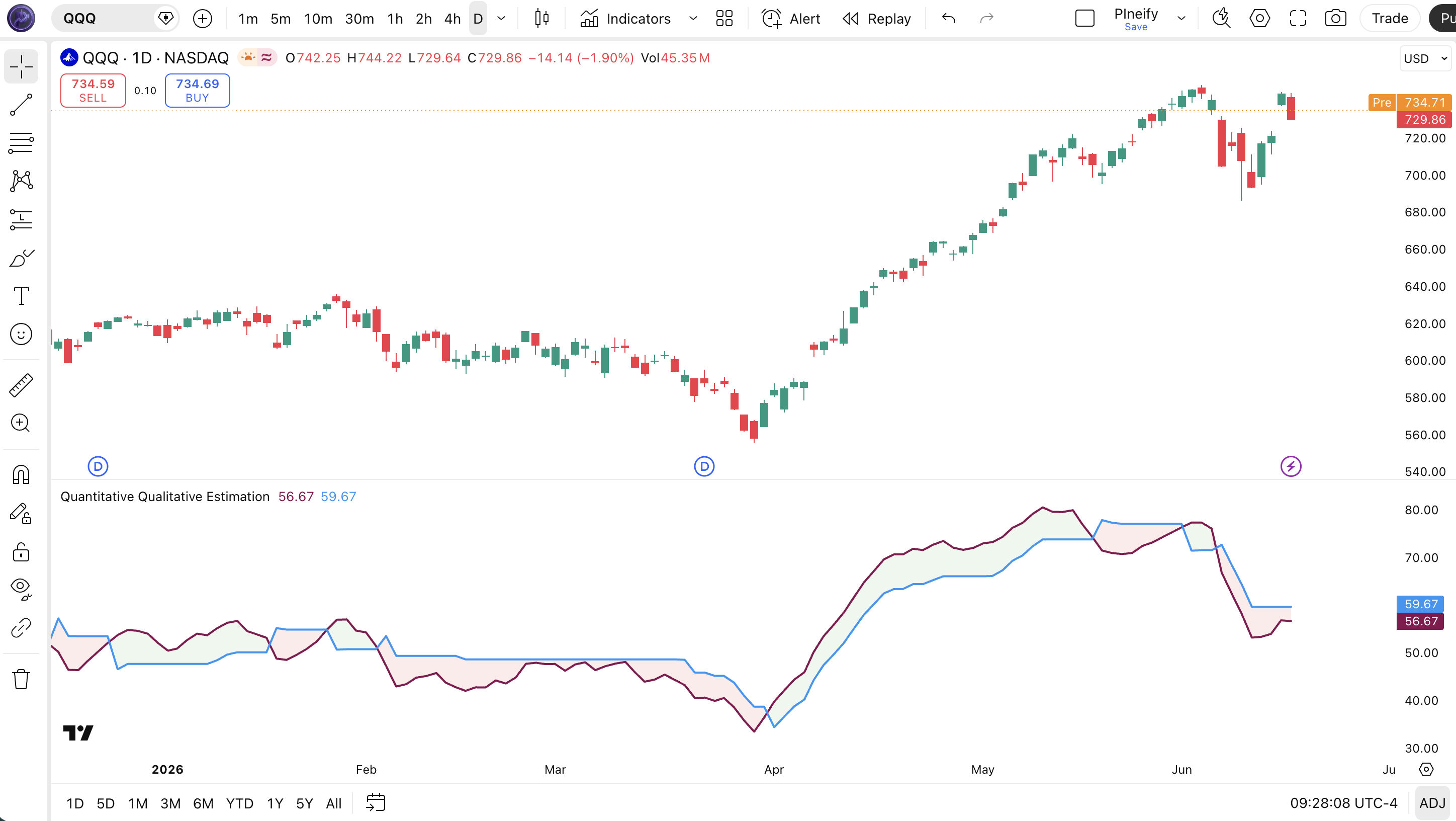
The function preserves Pineify's base QQE calculation. The surrounding example adds configurable source, RSI length, EMA smoothing, and bar-close alert gating. The multiplier remains fixed at 4.236. It is an indicator, so it does not place orders or produce strategy performance results.
// This source code is subject to the terms of the Mozilla Public License 2.0 at https://mozilla.org/MPL/2.0/
// © Pineify

//@version=6
indicator(title="Quantitative Qualitative Estimation", overlay=false, max_labels_count=500)

p_ta_qqe(series float source, simple int rsi_length, simple int rsi_smoothing_factor) =>
    rsii = ta.ema(ta.rsi(source, rsi_length), rsi_smoothing_factor)
    tr = math.abs(rsii - rsii[1])
    wwalpha = 1 / rsi_length
    wwma = 0.0
    wwma := wwalpha * tr + (1 - wwalpha) * nz(wwma[1])
    atr_rsi = 0.0
    atr_rsi := wwalpha * wwma + (1 - wwalpha) * nz(atr_rsi[1])
    qqef = ta.ema(ta.rsi(source, rsi_length), rsi_smoothing_factor)
    qup = qqef + atr_rsi * 4.236
    qdown = qqef - atr_rsi * 4.236
    qqes = 0.0
    qqes := qup < nz(qqes[1]) ? qup : qqef > nz(qqes[1]) and qqef[1] < nz(qqes[1]) ? qdown : qdown > nz(qqes[1]) ? qdown : qqef < nz(qqes[1]) and qqef[1] > nz(qqes[1]) ? qup : nz(qqes[1])
    buySignal = ta.crossover(qqef, qqes)
    sellSignal = ta.crossunder(qqef, qqes)
    [qqef, qqes, buySignal, sellSignal]

source = input.source(close, "Source")
rsiLength = input.int(14, "RSI length", minval=2)
smoothing = input.int(5, "RSI EMA smoothing", minval=1)
[p_ind_1_fast, p_ind_1_slow, p_ind_1_buySignal, p_ind_1_sellSignal] = p_ta_qqe(source, rsiLength, smoothing)

p_ind_1_fast_plot = plot(p_ind_1_fast, title="QQE - Fast Line", color=color.rgb(136, 14, 79, 0), linewidth=2)
p_ind_1_slow_plot = plot(p_ind_1_slow, title="QQE - Slow Line", color=color.rgb(33, 150, 243, 0), linewidth=2)
fill(p_ind_1_fast_plot, p_ind_1_slow_plot, title="QQE - Trend Color", color=p_ind_1_fast > p_ind_1_slow ? color.rgb(76, 175, 80, 90) : color.rgb(242, 54, 69, 90))

hline(50, "RSI midpoint", color=color.gray)

// Only the alert conditions wait for bar close; plots update intrabar.
confirmedUp = barstate.isconfirmed and p_ind_1_buySignal
confirmedDown = barstate.isconfirmed and p_ind_1_sellSignal
alertcondition(confirmedUp, title="QQE confirmed upward cross", message="QQE fast crossed above slow on a closed bar")
alertcondition(confirmedDown, title="QQE confirmed downward cross", message="QQE fast crossed below slow on a closed bar")- Open Pine Editor in TradingView, paste the complete script into a new indicator, save, and add it to the chart.
- Set source, RSI length, and smoothing. Match symbol, timeframe, chart type, inputs, and history when comparing implementations.
- Create an alert using a confirmed upward or downward cross condition and choose Once Per Bar Close. Recreate it after changing the script or inputs.
QQE, RSI, and QQE MOD are different comparisons
RSI measures relative upward and downward price changes. QQE adds smoothing and a trailing reference to that RSI. Stochastic RSI instead locates RSI within its recent range. These transformations should not be treated as interchangeable signals.
Mihkel00's QQE MOD combines two QQEs and a Bollinger Band confirmation layer. The author has revised the script, so a name alone is insufficient to reproduce its output. Record the author, revision, smoothing passes, multiplier, and thresholds. See the separate QQE MOD guide for that variant, or the QQE / RSI combination for a combined display.
What smoothing and confirmation cannot fix
- Repeated reversals can still cross a trailing line several times. More smoothing trades faster response for delay; it does not remove sideways losses.
- Plots update on an open bar. Requiring a confirmed close suppresses temporary intrabar alerts but does not prevent a new opposite cross on the next closed bar.
- A signal is not a price stop. QQE distance is measured in RSI points; a trading strategy still needs position size, price exits, costs, and an execution model.
- Settings fitted to one period may fail in another. Evaluate separate data with commission and slippage, and record the rule for entry and exit before judging results.
Adapt a defined QQE rule with Pineify
The Pine Script AI Coding Agent can help draft or edit a script from explicit rules. Supply the code above and request the specific changes, then explicitly request a syntax check. Syntax success does not verify strategy profitability or equivalence to a different author's QQE.
Use this base QQE function unchanged. Add a configurable 50-level filter to its confirmed upward and downward crosses. Keep the raw cross alerts available separately, explain the filter, and check the final Pine v6 syntax. Do not substitute QQE MOD.
Review the generated code and compare outputs in TradingView with identical inputs. For a protected or invite-only script, work from rules you are allowed to use; a script name does not provide its hidden source.
Open Pine Script AI Coding AgentQQE questions
Sources and implementation notes
Reviewed October 17, 2026. The code and numerical example define the exact base variant covered by this page.
- glaz: QQE MT4, the published smoothed-RSI and 4.236 trailing-line description.
- Mihkel00: QQE MOD, author explanation and revision history for the separate dual-QQE variant.
- TradingView: bar states and execution model, closed-bar confirmation and realtime recalculation.
- TradingView: alerts, condition selection, frequency, and saved alert configurations.