

Pivot Points High Low on TradingView: confirmation comes later
The Pivot Points High Low indicator identifies local swing prices with a left window and a right window. A candidate at bar i needs R later bars before it can qualify. In a script that waits for closed bars, the usable event is at the close of bar i + R, even if a label is drawn back at bar i.
Use this guide to check the timing and price of each detection. The copyable example exposes all four window inputs, retains confirmation labels, and offers a separate strict rule for equal prices.
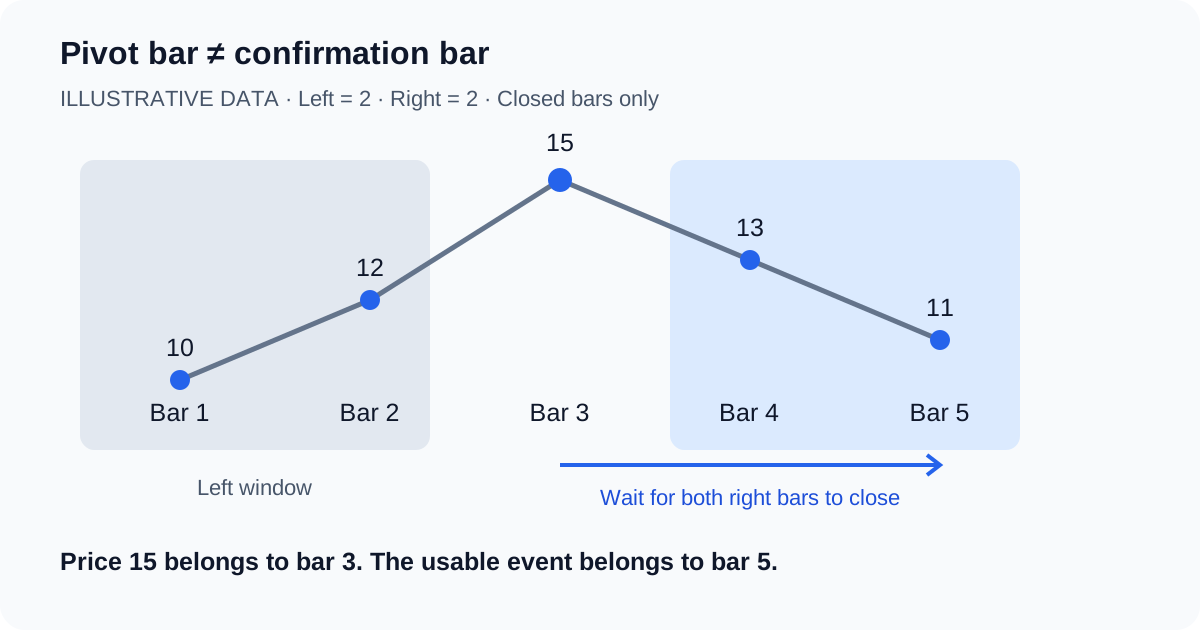
A five-bar confirmation example
Assume left = 2, right = 2 and highs of 10, 12, 15, 13, 11. The values are distinct, so native detection and the strict filter agree for the center candidate. Price 15 belongs to bar 3; the event belongs to bar 5.
| Bar close | High | What is known about bar 3? |
|---|---|---|
| 1 | 10 | Only the first left-side value exists. |
| 2 | 12 | Two earlier highs exist. No candidate at bar 3 yet. |
| 3 | 15 | Candidate exceeds both left highs; zero right bars have closed. |
| 4 | 13 | One right bar is lower. Confirmation is still unavailable. |
| 5 | 11 | Both right highs are lower. Emit pivot value 15 at this close. |
A low example reverses the comparison: lows of 10, 8, 5, 7, 9 confirm price 5 at bar 5. If the last high in the high example becomes 16 before bar 5 closes, bar 3 fails. No confirmed high event should be emitted.
With L = 5 and R = 10, confirmation still takes ten later bars. Reducing only the left window does not shorten that delay. On time-based charts, count actual bars; market closures can extend elapsed calendar time.
Equal highs and lows need an explicit rule
TradingView's conceptual description uses lower highs and higher lows, but does not fully specify which bar wins a plateau tie. Do not turn that wording into an undocumented promise that every built-in pivot uses strict comparisons on both sides. This example leaves native behavior intact by default.
For a strategy that requires unique extrema, enable Reject equal highs/lows. This custom filter requires the candidate high to exceed the maximum of each neighboring window, or the candidate low to be below the minimum of each window. An equal price on either side rejects it. This is an explicit additional policy, not a claim about TradingView's plateau selection.
| Fixture, oldest to newest | Center candidate | Custom strict result at bar 5 |
|---|---|---|
| Highs: 10, 12, 15, 13, 11 | 15 | Accept |
| Highs: 10, 15, 15, 13, 11 | 15; equal left neighbor | Reject |
| Highs: 10, 12, 15, 15, 11 | 15; equal right neighbor | Reject |
| Lows: 10, 8, 5, 7, 9 | 5 | Accept |
| Lows: 10, 5, 5, 7, 9 | 5; equal left neighbor | Reject |
| Lows: 10, 8, 5, 5, 9 | 5; equal right neighbor | Reject |
These are mathematical fixtures for the custom strict policy. They are not reported runtime measurements of the built-in functions.
Pine Script: retain the confirmation timestamp
Paste this indicator into Pine Editor and add it to the chart. Blue high labels and orange low labels stay on the confirmation bar, at the earlier pivot price. Turn on past marks only when you want to see which historical bar supplied that price.
//@version=6
indicator("Pivot Points High Low: confirmation timing", overlay=true, max_labels_count=500)

leftH = input.int(2, "High: left bars", minval=1, maxval=100)
rightH = input.int(2, "High: right bars", minval=1, maxval=100)
leftL = input.int(2, "Low: left bars", minval=1, maxval=100)
rightL = input.int(2, "Low: right bars", minval=1, maxval=100)
strictTies = input.bool(false, "Reject equal highs/lows (custom strict filter)")
backplot = input.bool(false, "Also mark past pivot bars (visual only)")

ph = ta.pivothigh(high, leftH, rightH)
pl = ta.pivotlow(low, leftL, rightL)
// Evaluate window comparisons on every bar, outside conditional branches.
leftMax = ta.highest(high[rightH + 1], leftH)
rightMax = ta.highest(high, rightH)
leftMin = ta.lowest(low[rightL + 1], leftL)
rightMin = ta.lowest(low, rightL)
uniqueHigh = high[rightH] > leftMax and high[rightH] > rightMax
uniqueLow = low[rightL] < leftMin and low[rightL] < rightMin
highReady = bar_index >= leftH + rightH and barstate.isconfirmed and not na(ph) and (not strictTies or uniqueHigh)
lowReady = bar_index >= leftL + rightL and barstate.isconfirmed and not na(pl) and (not strictTies or uniqueLow)

// These labels stay on the bar where the information becomes available.
if highReady
    label.new(bar_index, ph, "High confirmed: " + str.tostring(ph, format.mintick), style=label.style_label_down, color=color.blue, textcolor=color.white)
if lowReady
    label.new(bar_index, pl, "Low confirmed: " + str.tostring(pl, format.mintick), style=label.style_label_up, color=color.orange, textcolor=color.white)

// Negative offsets change display only; they do not move the confirmation event.
plot(backplot and highReady ? ph : na, "Past high (visual only)", color=color.blue, style=plot.style_cross, linewidth=3, offset=-rightH)
plot(backplot and lowReady ? pl : na, "Past low (visual only)", color=color.orange, style=plot.style_cross, linewidth=3, offset=-rightL)
alertcondition(highReady, "Pivot high confirmed", "A pivot high is confirmed on this closing bar.")
alertcondition(lowReady, "Pivot low confirmed", "A pivot low is confirmed on this closing bar.")
The default 2/2 windows are teaching inputs. Each side is independently adjustable from 1 to 100 bars. Strict filtering and historical crosses start off. The script requires the full window and a closed confirmation bar; it produces no orders.
The negative offsets on the two plots only relocate crosses. Alerts still use highReady or lowReady on the current bar. A backtest must use those event times, never infer an earlier entry from the cross position.
Check the behavior before adding trade rules
- Start with 2/2 windows and past marks off. Locate a distinct five-bar peak or trough and compare the confirmation label with the fifth bar.
- Increase only the right window. Recheck the candidate index and confirmation index; their distance must equal the new right length.
- Turn on past marks. The cross moves back to the pivot bar while its confirmation label stays where the event became available.
- Inspect equal-price cases with the strict filter on and off. Record the selected source, input lengths, candidate bar, and confirmation bar instead of assuming a tie rule.
- Create a confirmation alert with Once Per Bar Close. Recreate it after changing inputs, because an existing alert uses its saved script snapshot.
What the indicator cannot establish
A completed pivot is a local comparison result. It does not guarantee a reversal, a profitable breakout, or a support level that holds. Changing the chart timeframe changes the bars being compared. A data correction or different history can change the results. Default settings have no proven universal advantage.
Session highs and lows summarize a session boundary; this detector compares a neighborhood around one bar. Standard pivot-point support and resistance formulas are another calculation. Keep these meanings separate when specifying a script.
Educational code and hypothetical data. Not investment advice.
Describe a checkable pivot script to Pineify
Give the Pine Script AI Coding Agent your four window inputs, source series, equality policy, and required confirmation timing. Ask it to retain current-bar events when adding optional past labels. Compare its bar-by-bar output with a small fixture before adding strategy orders.
Use high and low sources with left = 2 and right = 2. Confirm only at bar close. Keep an event on the confirmation bar and an optional cross on the pivot bar. Reject equal neighboring prices when strict mode is enabled. Do not backdate orders.
Specify exits, position sizing, commission, and slippage separately if you turn the indicator into a strategy. Generating code does not establish trading performance.
Build with the Pine Script AI Coding AgentPivot Points High Low FAQ
It detects local swing highs and lows using bars before and after a candidate. A pivot price refers to an earlier bar; the detection event occurs after the right window is available. It does not calculate session-based pivot support and resistance levels.
For right bars R, a candidate at bar i can be confirmed at bar i + R. This example waits for that confirmation bar to close. With R = 2, a candidate at bar 3 becomes available at the close of bar 5, if the window still qualifies.
No. A negative plot offset moves the mark left on the chart. It cannot make the value available on the earlier bar. The example keeps confirmation labels in place and makes historical pivot crosses optional, so the two timestamps remain distinguishable.
The default example delegates detection to ta.pivothigh and ta.pivotlow. The official conceptual guide does not fully specify plateau tie-breaking. Enable the custom strict filter to require a high strictly above every neighbor, or a low strictly below every neighbor; any equal neighbor then rejects the candidate.
There is no universal best pair. The example uses 2/2 so its five-bar window is easy to inspect. Left bars control the earlier comparison window. Right bars control the later comparison window and confirmation delay. Changing left from 5 to 2 with right fixed at 10 still leaves a ten-bar delay.
A later bar outside a completed fixed window does not invalidate that window. An open confirmation bar can still change before its close, which is why this example gates events with barstate.isconfirmed. Data revisions, input changes, or a different chart dataset can change historical results.
Paste the full example into TradingView Pine Editor, save it, and add it to the chart. Choose a Pivot high confirmed or Pivot low confirmed condition in the alert dialog and use Once Per Bar Close. Recreate an alert after changing the script or its inputs.
No. A pivot high records a local maximum in a completed comparison window. It does not prove that resistance will hold. A trading strategy still needs entry and exit rules, position sizing, costs, and evaluation using the confirmation timestamp.
Sources and related references
Official documentation reviewed October 17, 2026. Example sequences and strict-equality fixtures are original illustrations.