

Elder Impulse System on TradingView
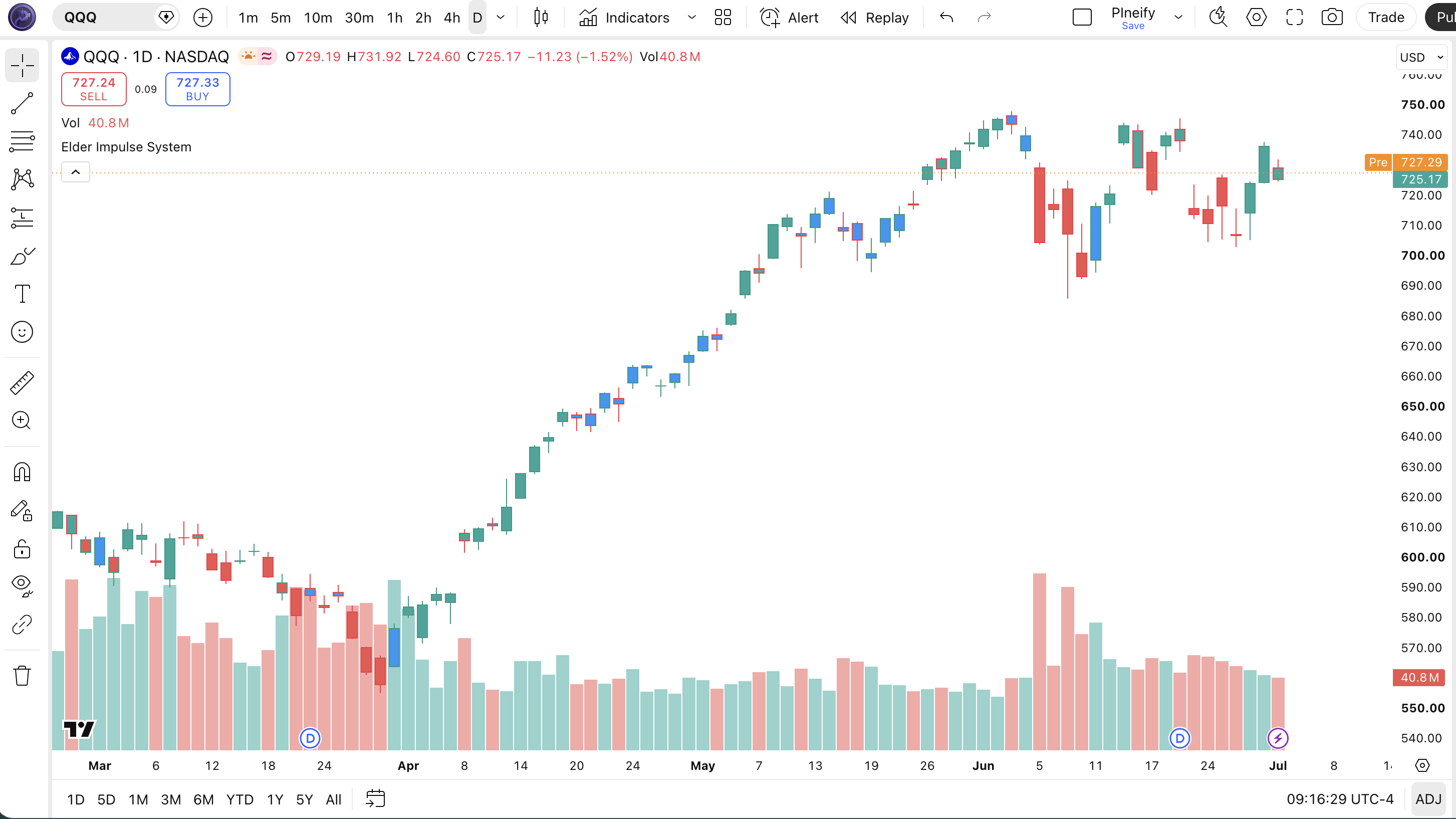
The Elder Impulse System colors a bar green when its 13-period EMA and MACD histogram both rise, red when both fall, and blue otherwise. Compare each value with the previous bar. A positive histogram alone is not enough for green.
Use this guide to audit the calculation, identify flat or mixed states, and decide when a bar becomes final. The color is a state description; entries, exits, sizing and trading costs need separate rules.
Formula and complete color matrix
The script calculates the MACD line as EMA(close, 12) minus EMA(close, 26), its signal as a 9-period EMA of that line, and the histogram as MACD minus signal. The separate trend calculation is EMA(close, 13). These lengths count chart bars.
ΔEMA = EMA[t] − EMA[t−1]
ΔHistogram = Histogram[t] − Histogram[t−1]
| EMA direction | Histogram rises | Histogram flat | Histogram falls |
|---|---|---|---|
| Rises | Green | Blue | Blue |
| Flat | Blue | Blue | Blue |
| Falls | Blue | Blue | Red |
Flat means exact equality, not two numbers rounded to the same displayed value. The script has no tolerance or minimum-slope threshold. A tiny change can therefore change the color. Adding a tolerance creates a modified rule that should be documented.
The matrix follows the StockCharts calculation; the component formulas match TradingView's MACD documentation. EMA and MACD both use close here, so their agreement is not independent evidence from two different data sources.
Worked example: six comparison states
These are hypothetical EMA and histogram outputs supplied to the color rule. They test comparisons only: they are not a price history, an EMA reconstruction or a backtest. Assume exact values and a closed bar for each row.
| Bar | EMA | Histogram | ΔEMA | ΔHistogram | Result |
|---|---|---|---|---|---|
| A | 100.00 | −0.40 | Baseline | Baseline | No prior comparison |
| B | 100.20 | −0.20 | +0.20 | +0.20 | Green |
| C | 100.35 | −0.25 | +0.15 | −0.05 | Blue |
| D | 100.25 | −0.35 | −0.10 | −0.10 | Red |
| E | 100.25 | −0.30 | 0.00 | +0.05 | Blue |
| F | 100.40 | −0.30 | +0.15 | 0.00 | Blue |
At B, −0.20 − (−0.40) = +0.20: momentum rises below zero, and the EMA rises too. At C, the EMA keeps rising but the histogram falls by 0.05, producing blue. D satisfies both falling tests. E and F show why a tie in either component prevents green or red.
Row A provides a comparison baseline. In the script, the first loaded bar has no prior values; its comparisons do not establish either directional condition, so the fallback color is blue. Treat that as unavailable history, not evidence of a neutral market. Early EMA values also depend on initialization.
Pine Script v6: inspect and copy
Paste this complete indicator into TradingView's Pine Editor, save it, and add it to a chart. It colors existing price bars. The lengths are fixed in the source: the script does not expose length inputs, generate orders or define alerts.
//@version=6
indicator(title="Elder Impulse System", overlay=true, max_labels_count=500)

// Calculate MACD
macd_ma_fast = ta.ema(close, 12)
macd_ma_slow = ta.ema(close, 26)
macd = macd_ma_fast - macd_ma_slow
macd_signal = ta.ema(macd, 9)
macd_histogram = macd - macd_signal

// Calculate 13-period EMA
ema = ta.ema(close, 13)

// Determine Elder Impulse
elder_bulls = (ema > ema[1]) and (macd_histogram > macd_histogram[1])
elder_bears = (ema < ema[1]) and (macd_histogram < macd_histogram[1])
elder_color = elder_bulls ? 1 : elder_bears ? -1 : 0

// Bar Coloring
barcolor(elder_color == 1 ? color.rgb(38, 166, 154) :
         elder_color == -1 ? color.rgb(239, 83, 80) :
         color.rgb(33, 150, 243), title="EIS Bar Color")
For a chart comparison, add an EMA with length 13 and source close, then MACD with 12/26/9 and EMA smoothing for both oscillator and signal. Compare their values on two adjacent closed bars. Keep symbol, timeframe, session and chart type identical.
Confirmation and when a trade should wait
The current bar can change color before it closes. Its latest price changes the EMA and histogram, so an intrabar green reading may finish blue or red. This example has no bar-close gate. A close-confirmed adaptation should require barstate.isconfirmed at the point where its signal becomes actionable, as described in TradingView's bar-state documentation.
- Direction filter: a rule that blocks shorts on green and longs on red still needs a separate entry setup. A permitted direction is not an instruction to place an order.
- Blue state: the two directional tests are not aligned. Skipping every blue bar is an optional strategy restriction. Blue alone does not prove low volatility, predict a reversal, or require an exit.
- Missing comparison or open bar: wait if the trading plan requires valid previous values and a final color. Initial blue fallback and an unconfirmed color do not meet those requirements.
- Multiple timeframes: this code uses only the chart timeframe. If a plan separately checks a higher timeframe, define that bar's confirmation rule too; the chart bar closing does not close the higher-timeframe bar.
Confirmation resolves one timing issue. It does not prove a profitable signal, prevent rapid color changes between closed bars, or remove changes caused by revised source data. See TradingView's repainting discussion. Define exits, risk limits, commission and slippage before testing a strategy built around these states.
Specify the behavior in Pineify
Pineify's Pine Script AI Coding Agent can help turn these requirements into an editable indicator. Give it the comparison rules and expected results before asking for extra features.
Create an Elder Impulse System indicator using close, EMA 13, and MACD 12/26/9. Expose the four lengths as inputs. Use strict comparisons; ties are blue. Add a close-confirmed mode and distinguish missing history from neutral states. Include the EMA, histogram and state values in the Data Window so I can check adjacent bars. Keep entry and exit orders separate.
Review the generated code against the matrix, test the below-zero example and both tie cases, then compare live and closed-bar behavior. Syntax validation checks the script's language; it does not validate trading performance.
Open Pine Script AI Coding AgentEducational information, not investment advice. The example does not establish a trading edge.
Frequently asked questions
Sources and related reading
- StockCharts: Elder Impulse System calculation
- TradingView: MACD calculation
- TradingView: bar states and confirmation
- TradingView: repainting
Sources checked October 17, 2026. Worked values are hypothetical.