

Choppiness Index on TradingView: formula and limits
The Choppiness Index compares accumulated true range with the high-to-low span of a price window. Higher readings describe more movement within that span; lower readings describe a more direct path. CHOP does not tell you whether price is rising or falling. Use the formula, calculation table and Pine Script below to check what each bar actually measures.
Educational calculation guide. No trading performance is claimed.
What the Choppiness Index formula measures
TradingView attributes CHOP to E.W. Dreiss and documents this calculation for a window of n bars:
CHOP = 100 × log10(Σ TR / (highest high − lowest low)) / log10(n)Each bar contributes TR = max(high − low, |high − previous close|, |low − previous close|). Sum those n values. The denominator inside the logarithm is the highest high minus the lowest low across the same n bars, including the current bar. It is not the change between the first and last close.
The documented ATR(1) term is one-bar true range, not ATR(n). Summing a smoothed 14-bar ATR changes the calculation. Both logarithms must use the same base: log10(ratio) / log10(n) equals ln(ratio) / ln(n). Length 1 is invalid because log(1) is zero.
The ratio is unitless. If the sum equals the span, CHOP is 0; if the sum equals n times the span, CHOP is 100. Those two identities explain the normalization, without making either value a forecast.
Source: TradingView CHOP definition and formulaA three-bar calculation you can reproduce
These are synthetic prices, not a backtest. Set n = 3 and the close before bar 1 to 100. Each row supplies a valid high, low and close; the open is unnecessary for CHOP.
| Bar | Previous close | High | Low | Close | H − L | |H − Cprev| | |L − Cprev| | TR |
|---|---|---|---|---|---|---|---|---|
| 1 | 100 | 102 | 100 | 101 | 2 | 2 | 0 | 2 |
| 2 | 101 | 102 | 100 | 100 | 2 | 1 | 1 | 2 |
| 3 | 100 | 102 | 100 | 101 | 2 | 2 | 0 | 2 |
Σ TR = 2 + 2 + 2 = 6. Window range = 102 − 100 = 2. CHOP = 100 × log10(6 / 2) / log10(3) = 100.
For contrast, use three successive ranges [100, 102], [102, 104], [104, 106], with each close at its high and the preceding close at 100. TR still sums to 6, but the window range is now 6, so CHOP is 0. Reversing that path produces the same score.
A third check: keep the original three bars but change only the close before bar 1 to 120. The first TR becomes 20, the sum is 24 and the window range stays 2. CHOP becomes about 226.19. This window-edge gap is why the raw formula is not always bounded by the familiar 0 to 100 scale. Do not silently clamp it when comparing implementations.
Pine Script v6 with explicit edge handling
This indicator preserves the raw formula and exposes its two inputs to the Data Window. It waits for a full window, rejects length 1, returns na for a zero range, and defaults to displaying only closed bars. It places no trades.
// This source code is subject to the terms of the Mozilla Public License 2.0 at https://mozilla.org/MPL/2.0/
// © Pineify
//@version=6
indicator("Choppiness Index - Calculation Check", shorttitle="CHOP Check", overlay=false, precision=2)

length = input.int(14, "Length", minval=2, maxval=1000)
upper = input.float(61.8, "Upper reference", minval=0, maxval=100)
lower = input.float(38.2, "Lower reference", minval=0, maxval=100)
confirmedOnly = input.bool(true, "Show only closed bars")

if lower >= upper
    runtime.error("Lower reference must be below upper reference.")

tr = ta.tr(true)
trSum = math.sum(tr, length)
windowHigh = ta.highest(high, length)
windowLow = ta.lowest(low, length)
priceRange = windowHigh - windowLow
ready = bar_index >= length - 1 and not na(trSum)
valid = ready and priceRange > 0 and trSum > 0
chop = valid ? 100 * math.log10(trSum / priceRange) / math.log10(length) : na
showValue = not confirmedOnly or barstate.isconfirmed

plot(showValue ? chop : na, "CHOP", color=color.blue, linewidth=2, style=plot.style_linebr)
hline(upper, "Upper reference", color=color.gray)
hline(lower, "Lower reference", color=color.gray)
plot(showValue and ready ? trSum : na, "TR sum", display=display.data_window)
plot(showValue and ready ? priceRange : na, "Window range", display=display.data_window)
The script uses ta.tr(true), which falls back to high − low if the previous close is unavailable. That can affect the first complete window at the start of the loaded dataset. Pine built-ins documentation
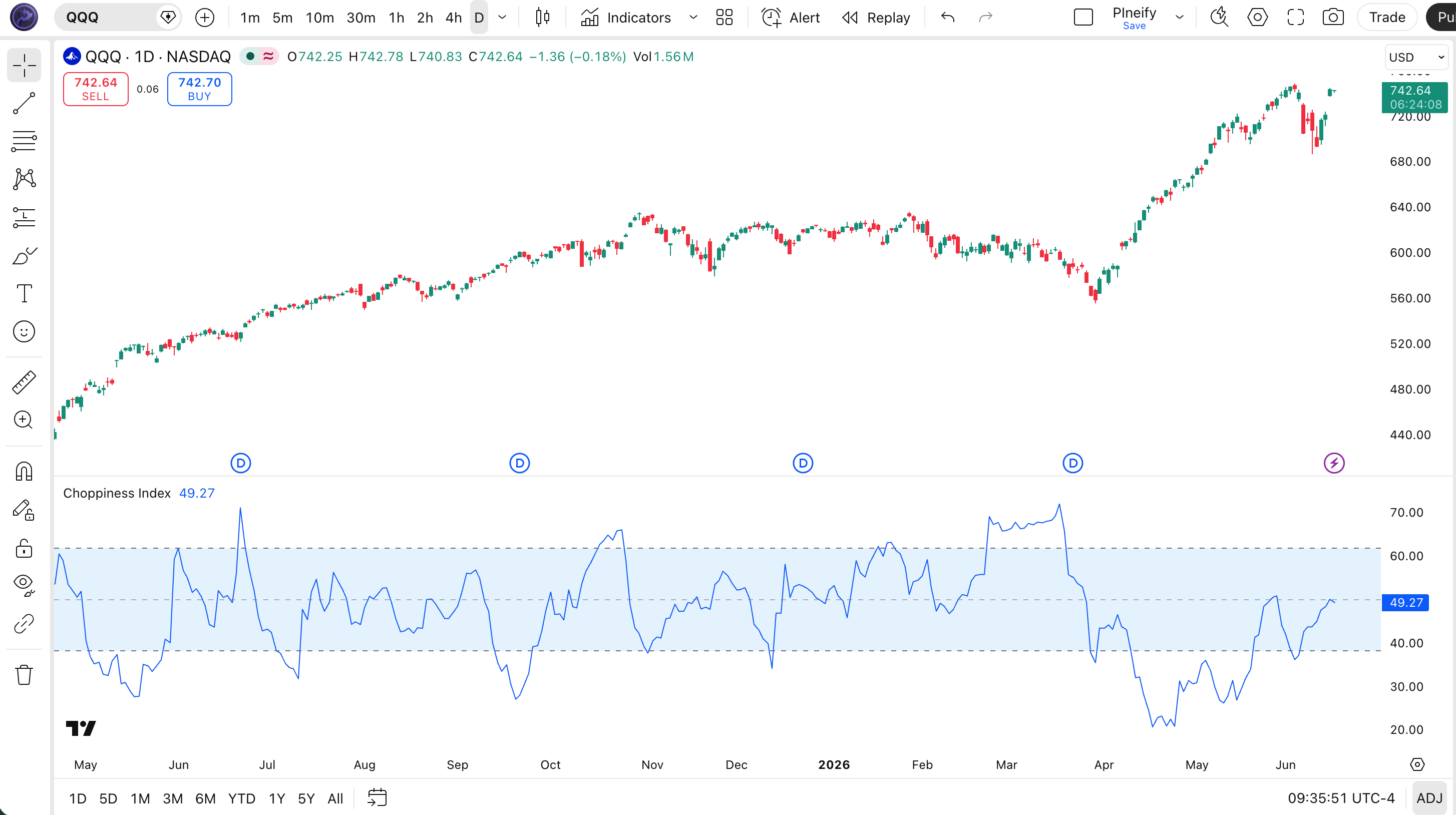
Inputs and a bar-by-bar verification checklist
| Input | Example default | Effect |
|---|---|---|
| Length | 14 | Changes the TR sum, extrema window and log(n) divisor together; allowed 2 to 1000 in this script. |
| Upper / lower references | 61.8 / 38.2 | Display levels only; lower must be below upper. No order logic uses them. |
| Show only closed bars | On | Hides the developing bar until its closing update. |
- Use the same symbol, exchange, timeframe, session and standard candle data for both implementations. Set the built-in CHOP offset to 0.
- Match length and inspect a closed bar after the initial window. Count exactly n bars ending at that bar.
- Calculate each TR using its own previous close, including the close just outside the window for the oldest bar.
- Compare TR sum and Window range in the Data Window, then calculate the logarithmic ratio. Compare full values before display rounding.
- Repeat at a gap, a flat window and an ordinary window. If values differ, resolve data and formula differences before testing thresholds.
How to read CHOP without inventing a trade signal
TradingView documents 61.8 and 38.2 as common reference levels. They are conventions, not universally optimal settings. A crossing changes a regime label; it does not specify a trade direction, entry price, exit or position size.
- Flat window: if all highs and lows equal 100, the price range is zero. With a preceding close of 100, the numerator is also zero. The script leaves a gap instead of assigning 0 or 100.
- Rolling extrema: when an old high or low leaves the window, its range can change abruptly even without a large current candle. Recompute the entire window before attributing a CHOP move to current price action.
- Realtime bar: an unfinished high or low can change the ratio. The default waits for barstate.isconfirmed, which is true on historical bars and the closing realtime update. TradingView bar-state documentation.
- Parameter comparisons: changing length changes both the sample and normalization. Keep a separate evaluation period before treating any chosen threshold as useful for a strategy.
If you add CHOP as a filter, define the directional entry rule independently, then specify exits, order timing, commission and slippage. A correct indicator calculation is only the first check; it provides no evidence that a strategy is profitable.
Turn the calculation contract into a Pineify script
Pineify's Pine Script AI Coding Agent can help generate or edit the script from written requirements. Give it the calculation contract, then inspect the resulting code and compare its closed-bar values before adding strategy rules.
Create a Pine v6 CHOP indicator with length 14, minimum length 2, a sum of true ranges, and the highest-high minus lowest-low denominator over the same window. Return na for a zero range or insufficient history. Keep raw values without clipping. Add a closed-bar display option and expose TR sum and window range in the Data Window. Do not add buy or sell orders.Explore Pine Script AI Coding Agent
Start with numerical agreement. Define exits and trading costs in a separate strategy specification.
Choppiness Index questions
Related calculation guides
Inspect the true-range component before applying CHOP normalization.
TradingView indicatorsFind related indicator calculation and interpretation guides.
Sources checked October 17, 2026. Worked prices are illustrative; this page is educational and is not investment advice.