

Chande Kroll Stop indicator: formula and limits
Chande Kroll Stop calculates two price levels from ATR offsets and rolling highs and lows. Use it to inspect potential exit rules on TradingView, then define order timing separately. The formula does not enforce a one-way trailing stop, and a plotted line is not an executed order.
Two stages, four calculations
TradingView attributes Chande Kroll Stop to Tushar Chande and Stanley Kroll and their book The New Technical Trader. Its help page describes the ATR-based stop concept. The definitions below specify the exact implementation used by this page, including its existing line names.
H1 = highest(high, p) − x × ATR(p)
L1 = lowest(low, p) + x × ATR(p)
Stop Short = highest(H1, q)
Stop Long = lowest(L1, q)
Both windows include the current bar. ATR in the example uses ta.atr(p), which applies Wilder-style RMA smoothing to true range. True range is the maximum of high minus low, the absolute high minus previous close, and the absolute low minus previous close. This captures gaps as well as the candle range.
The second stage chooses an extreme from preliminary stop values. It is not an additional moving average. Each candidate retains the ATR value calculated on its own bar; applying today's ATR to an older price extreme is a different calculation.
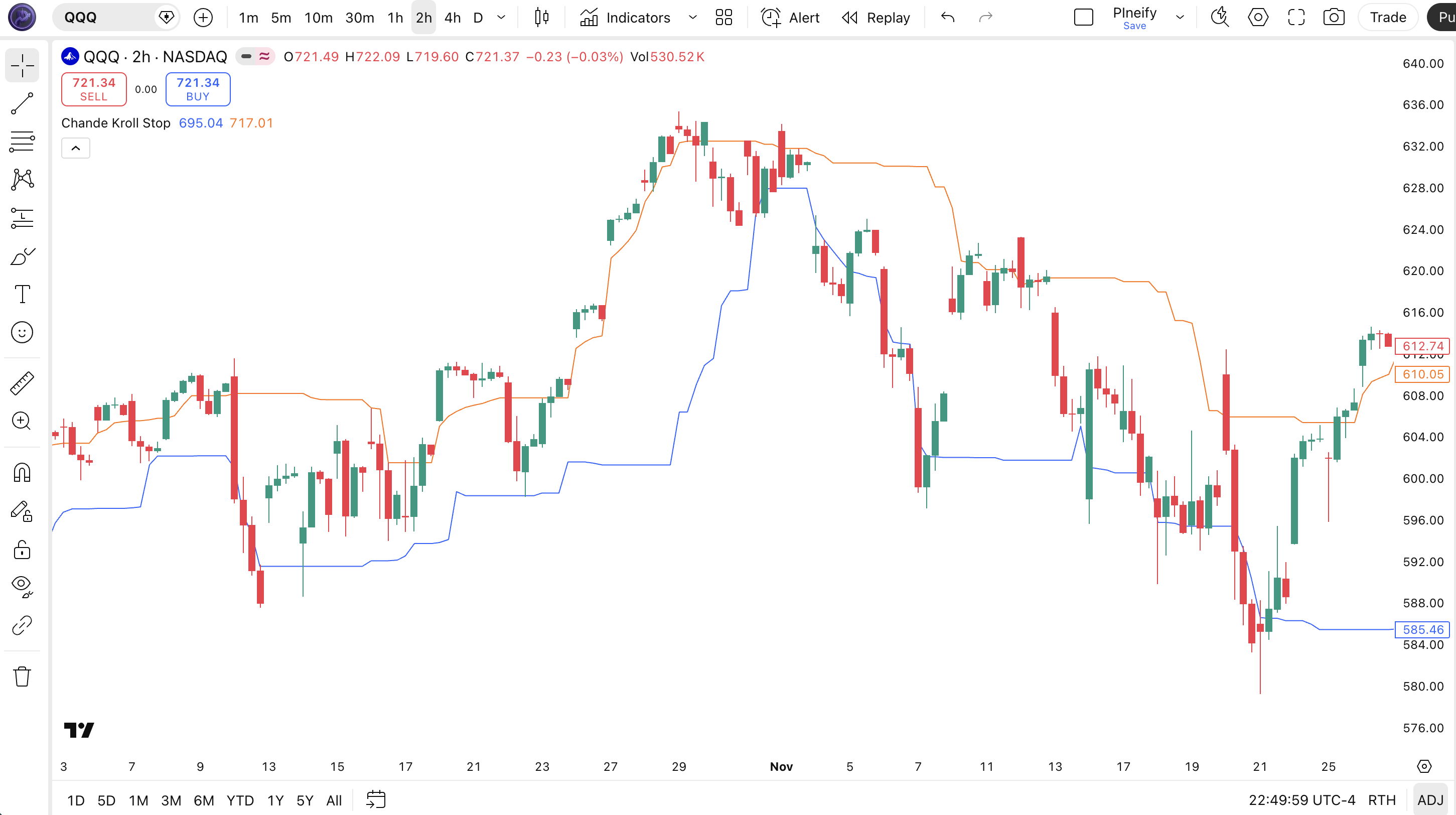
Read the formula before the label. In this example, blue Stop Long comes from L1 and orange Stop Short comes from H1. Neither label guarantees that its line stays below or above current price. For a new protective sell stop on a long position, check that the proposed trigger is below the market; for a buy stop on a short position, check that it is above. A crossed or invalid-side level needs an explicit exit rule.
Worked example: an old maximum leaves the window
Synthetic prices, not market data or a backtest. Use p=3, x=1 and q=2. Bars A and B have high/low/close values of 110/106/108 and 109/105/107. Their true ranges are both 4, using high minus low for the first bar. Continue with C=108/104/106, D=107/103/105, E=106/102/104 and F=105/99/100. All amounts are in price units; the open is unused by this formula.
| Bar | High(3) | Low(3) | ATR(3) | H1 | L1 | Stop Short | Stop Long |
|---|---|---|---|---|---|---|---|
| C | 110 | 104 | 4 | 106 | 108 | Warm-up | Warm-up |
| D | 109 | 103 | 4 | 105 | 107 | 106 | 107 |
| E | 108 | 102 | 4 | 104 | 106 | 105 | 106 |
| F | 107 | 99 | 4.667 | 102.333 | 103.667 | 104 | 103.667 |
C initializes ATR as (4+4+4)/3 = 4. F has true range 6, so its ATR is (2×4+6)/3 = 4.6667. The table rounds only the displayed values. At D, Stop Short = max(106, 105) = 106 and Stop Long = min(108, 107) = 107. At E, C leaves the two-bar window: the orange line falls to 105. At F, the new L1 value pulls the blue line down to 103.667.
Both lines can move down in this sequence. A rule that locks a long position's stop at the greater of its previous stop and a new candidate would behave differently. Such a rule also needs an entry initialization and a reset after exit; the indicator does neither.
Pine Script v6 calculation example
Paste the complete code into TradingView's Pine Editor and choose Add to chart. Inputs are editable in settings. This retains the original four-step calculation and line names while adding a decimal multiplier, a full-window check and a confirmed-bar display option.
//@version=6
indicator("Chande Kroll Stop: calculation check", overlay=true)

p = input.int(10, "ATR and price lookback (p)", minval=1)
x = input.float(1.0, "ATR multiplier (x)", minval=0.1, step=0.1)
q = input.int(9, "Stop lookback (q)", minval=1)
confirmedOnly = input.bool(true, "Plot only confirmed bars")

// Preserve the original example's line names.
p_ta_chande_kroll_stop(simple int p, simple float x, simple int q) =>
    atrValue = ta.atr(p)
    first_high_stop = ta.highest(high, p) - x * atrValue
    first_low_stop = ta.lowest(low, p) + x * atrValue
    stop_short = ta.highest(first_high_stop, q)
    stop_long = ta.lowest(first_low_stop, q)
    fullWindow = not na(first_high_stop[q - 1]) and not na(first_low_stop[q - 1])
    [stop_long, stop_short, fullWindow]

[stopLong, stopShort, ready] = p_ta_chande_kroll_stop(p, x, q)
showValues = ready and (not confirmedOnly or barstate.isconfirmed)

plot(showValues ? stopLong : na, "CKS - Stop Long", color=color.blue, linewidth=2, style=plot.style_linebr)
plot(showValues ? stopShort : na, "CKS - Stop Short", color=color.orange, linewidth=2, style=plot.style_linebr)
The function runs on every bar. With continuous OHLC data, a full window becomes available after p+q−1 bars: 18 with these inputs. The explicit guard hides early partial results. This is the example's initialization policy, so compare later closed bars when another script uses a different policy.
What each setting changes
| Input | Example default | Effect and constraint |
|---|---|---|
| p | 10 bars | Changes both ATR smoothing and the high/low lookback. Integer of at least 1. |
| x | 1.0 | Scales each preliminary ATR offset. Decimal input; this example permits 0.1 or greater. |
| q | 9 bars | Chooses a maximum or minimum from q preliminary values. Integer of at least 1; q=1 removes this second selection. |
| Confirmed bars | On | Hides the open-bar value until close. Turning it off shows provisional calculations. |
For a fixed bar and fixed p, increasing x lowers H1 and raises L1. The q-bar maximum of H1 therefore cannot increase, and the q-bar minimum of L1 cannot decrease, when only x increases on identical data. That does not imply a fixed distance from current price or better trading results.
On identical inputs, increasing q cannot lower the selected maximum or raise the selected minimum. Increasing p is less predictable because it changes both the price extremes and ATR. Record the changed input and compare the two output series before judging a trading rule.
Live updates and confirmed signals
TradingView indicators recalculate on updates to the open bar. New highs, lows and gaps can change ATR and both lines before close. With the default confirmed-bar option, this script publishes that bar's plot only at confirmation. It creates no alerts or orders. If you later add a close-based signal, explicitly require bar confirmation; if you use an intrabar stop, define when its price is submitted and updated.
A stop reference is not a fill price
Suppose a long position already has an active sell-stop order at 102, yesterday's close is 105, and the next bar opens at 98. The order was crossed in the gap. Under TradingView's documented broker-emulator gap rule, the fill is at 98, not 102. With one unit and a point value of 1, the fill is 4 price units worse than the trigger, before fees.
This is a separate execution example, not a trade generated by the table. If an exit condition is only evaluated at the new bar's close, no stop order necessarily existed during that gap. A later recalculated line cannot retroactively protect the trade.
- Define which formula supplies the long and short exit candidates, including what happens when a candidate is already crossed.
- Specify whether a stop can loosen, when it resets, and whether updates use intrabar or confirmed data.
- Keep order type, position quantity, tick rounding, commissions and slippage explicit. Live stop-market and stop-limit orders have different fill risks.
- Treat repeated crossings in a range as observations to test. A crossing alone does not establish a profitable entry or a confirmed trend reversal.
Educational calculation reference, not investment advice. Syntax validation does not validate profitability or live execution.
Use Pineify to make the rules inspectable
The Pine Script AI Coding Agent can help write and revise the script from a stated rule. Give it the formula and confirmation policy first; inspect the resulting calculations before adding a strategy.
- Open the Pine Script AI Coding Agent and provide this example as the starting code.
- Specify p, x, q, the line-to-position mapping and whether open-bar values are allowed.
- Request intermediate H1, L1 and ATR values in the Data Window for comparison.
- Check closed-bar outputs against a hand calculation on the same symbol, session and timeframe.
- Define entry, exit, stop updates and trading costs separately before evaluating a strategy.
Chande Kroll Stop questions
Sources and related calculations
Official references reviewed October 17, 2026. The worked example is original arithmetic; the source code defines its exact line mapping and warm-up policy.
- TradingView: Chande Kroll Stop
- TradingView: Average True Range
- Pine Script: execution model
- Pine Script: strategies and broker emulator