

Balance of Power Indicator: Formula and Limits
The Balance of Power indicator divides the signed candle body by its high-to-low range. It describes how much of that range the open-to-close change occupies. It uses OHLC prices, not volume or trade direction data.
BOP = (Close − Open) / (High − Low)
For valid OHLC with High > Low: −1 ≤ BOP ≤ +1. A flat bar needs an explicit handling rule.
Use the worked bars to audit a calculation, then copy the script with a zero-range guard, optional SMA, and alerts that wait for bar close. A positive raw value means Close > Open; it does not establish a bullish trend or reveal actual aggressive buying volume.
Check the formula with five candles
These invented OHLC values are arithmetic fixtures, not market observations or backtest results. A, B, and C can be read as three consecutive bars; D and E are independent edge cases. Prices use arbitrary units.
| Case | Open | High | Low | Close | Body / range | BOP |
|---|---|---|---|---|---|---|
| A: up candle | 100 | 110 | 100 | 106 | 6 / 10 | +0.60 |
| B: down candle | 106 | 108 | 98 | 103 | −3 / 10 | −0.30 |
| C: flat candle | 103 | 103 | 103 | 103 | 0 / 0 | 0 by convention |
| D: below midpoint | 91 | 110 | 90 | 94 | 3 / 20 | +0.15 |
| E: small range | 100 | 100.10 | 100 | 100.08 | 0.08 / 0.10 | +0.80 |
Smoothing changes the question. A three-bar SMA at C is (0.60 − 0.30 + 0) / 3 = +0.10 under the zero-fill convention in this script. C itself has no directional body. The average remains positive because it includes A and B.
Positive does not mean above the midpoint. In D, the midpoint is 100, while the close is 94. BOP is still +0.15 because the open was 91. The denominator sets the scale; the open sets the sign.
A ratio hides absolute size. E has a body of only 0.08 yet BOP is +0.80. Multiplying all its prices by 100 preserves the ratio while changing the price movement. Read range and price context separately.
Balance of Power Pine Script v6
Paste this indicator into the TradingView Pine Editor, save it, and add it to the chart. The raw line always remains visible; enabling the SMA adds an average and changes the series used by the two alert conditions.
// This source code is subject to the terms of the Mozilla Public License 2.0 at https://mozilla.org/MPL/2.0/
// © Pineify
//@version=6
indicator("Balance of Power: raw and optional SMA", overlay=false)

useSmoothing = input.bool(false, "Use SMA for alerts")
length = input.int(14, "SMA length", minval=1)

barRange = high - low
// A zero-range bar is undefined mathematically; use 0 by explicit convention.
rawBop = barRange > 0 ? (close - open) / barRange : 0.0
smoothedBop = ta.sma(rawBop, length)
selectedBop = useSmoothing ? smoothedBop : rawBop

plot(rawBop, "Raw BOP", color=color.gray)
plot(useSmoothing ? smoothedBop : na, "BOP SMA", color=color.blue, linewidth=2)
hline(0, "Zero", color=color.gray)

crossUp = ta.crossover(selectedBop, 0)
crossDown = ta.crossunder(selectedBop, 0)
alertcondition(barstate.isconfirmed and crossUp, "BOP crosses above zero", "Selected BOP crossed above zero on a closed bar.")
alertcondition(barstate.isconfirmed and crossDown, "BOP crosses below zero", "Selected BOP crossed below zero on a closed bar.")
Copy the complete example into the Pine Editor.
The zero-range branch returns 0 deliberately. Choosing na instead would require a separate missing-value and smoothing policy; it would not be equivalent to including a neutral zero. This example assumes valid, available OHLC data.
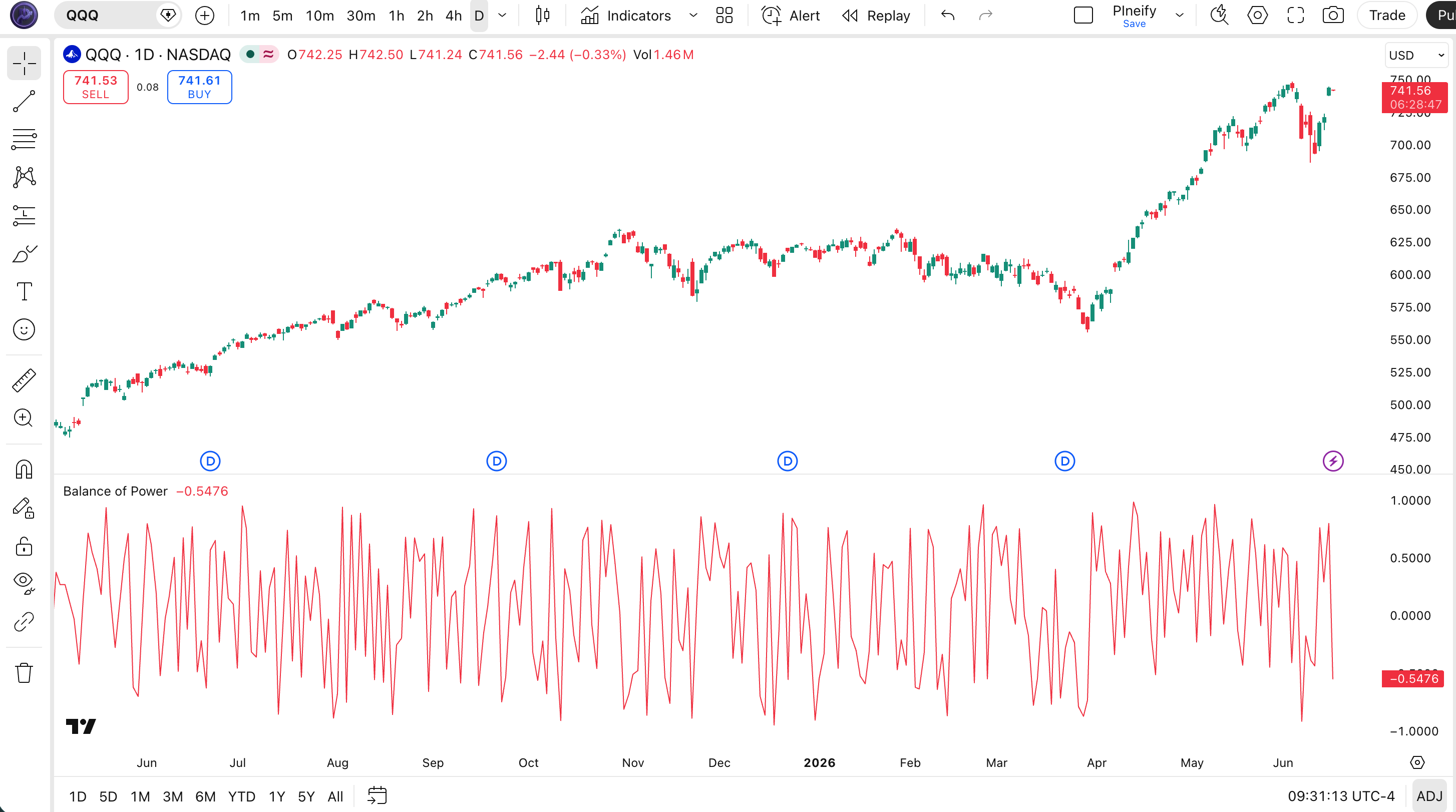
Inputs, chart behavior, and confirmation
| Control | Example default | What to check |
|---|---|---|
| Use SMA for alerts | Off | Off: alerts use raw BOP. On: alerts use the SMA and the blue line appears. |
| SMA length | 14 bars | Minimum 1. Length 1 reproduces raw BOP; length 3 reproduces the A to C example. |
| Zero-range handling | 0, fixed in code | The average includes the zero. Changing this rule changes subsequent smoothed values. |
| Alert confirmation | Bar close, fixed in code | The plotted values can change intrabar. Named alert conditions require barstate.isconfirmed. |
The 14-bar length is a demonstration choice, not an optimized setting. An SMA needs enough observations before it returns a value. Increasing its length mixes more previous bars into the result and can delay a zero crossing relative to a new raw reading.
On an open bar, close, high, and low can change, so the ratio and a provisional crossing can change too. The script computes crosses on every execution but permits its alert condition only on a confirmed bar. Select a named BOP condition when creating an alert; drawing the indicator alone does not create an alert. See the TradingView bar-state documentation and execution model.
How to use BOP without reading too much into it
- Audit values before rules. Pick closed candles, record all four prices, and compare the manual ratio with the raw plot in the Data Window. Keep raw and smoothed readings separate.
- Check gaps separately. Suppose the previous close was 120 and the next bar has O=110, H=114, L=108, C=112. BOP is +2/6, about +0.333, while the close-to-close change is −8. The raw ratio does not include the overnight gap.
- Do not infer order flow. Identical OHLC bars produce identical BOP even if their volumes and trade sequences differ. BOP cannot distinguish which trades were initiated at the bid or ask.
- Treat crossings as conditions to investigate. Alternating up and down bodies can repeatedly change the sign. An SMA may reduce some fluctuations but cannot establish that the remaining conditions have a profitable edge.
- Define a strategy separately. Specify the entry timing, exits, position sizing, fees, and slippage before evaluating trades. This script is an indicator with alert conditions, not a strategy or an execution system.
Educational calculation and implementation examples. No win rate, predictive accuracy, or trading return is established here; this is not investment advice.
Balance of Power versus Elder-Ray
The similar names do not imply interchangeable formulas. the TradingView Bull Bear Power documentation describes EMA-relative highs and lows and sums those components.
| Property | Balance of Power | Elder-Ray / TradingView BBP |
|---|---|---|
| Reference | Current open and current range | EMA of closes; default length 13 in TradingView BBP |
| Calculation | (Close − Open) / (High − Low) | Bull = High − EMA; Bear = Low − EMA; BBP = Bull + Bear |
| Units | Dimensionless ratio | Price units |
| History | Raw value uses one bar; optional SMA adds history | EMA carries information from previous closes |
As a hypothetical comparison, take O=100, H=110, L=90, C=106 and EMA=108. BOP is +6/20 = +0.30. Bull Power is +2, Bear Power is −18, and their sum is −16. The opposite signs are consistent: the body rose from the open, but the high-low midpoint is below the EMA.
Turn the calculation into a checkable Pineify request
Use the Pine Script AI Coding Agent to describe changes to the example. State the calculation and edge cases explicitly so the generated code can be checked against the same fixtures.
Create a Pine Script v6 BOP indicator using OHLC body divided by range. Use zero for a zero-range bar. Keep a raw plot, add an optional SMA with a configurable length, and confirm zero-crossing alert conditions at bar close. Keep the selected alert series explicit. Do not add strategy orders.
- Open the Pine Script AI Coding Agent and provide the calculation request.
- Inspect the inputs, zero-range branch, plots, and selected alert source.
- Check the generated Pine syntax, then add the script to a TradingView chart.
- Compare closed-bar values with the Data Window and a manual OHLC calculation.
- Define exits and costs separately if you later request a strategy.
Balance of Power questions
Sources and related indicators
Technical sources checked on October 17, 2026. TradingView attributes BOP to Igor Livshin and its public introduction to Stocks and Commodities in 2001. The worked candles, smoothing fixture, and implementation choices on this page are our own demonstrations.
- TradingView: Balance of Power formula and smoothing
- TradingView: Bull Bear Power calculation
- Pine Script: bar states and confirmation
- Pine Script: execution model
Bull Bear Power
Compare highs and lows with an EMA instead of normalizing a candle body.
Money Flow Index
Explore an oscillator whose inputs include volume.
On Balance Volume
Read a cumulative volume series classified by close-to-close direction.
Average Directional Index
Explore a separate measure of trend strength.