

DAILY VOLATILITY · PINE SCRIPT V6
Average Daily Range on TradingView: Formula and Limits
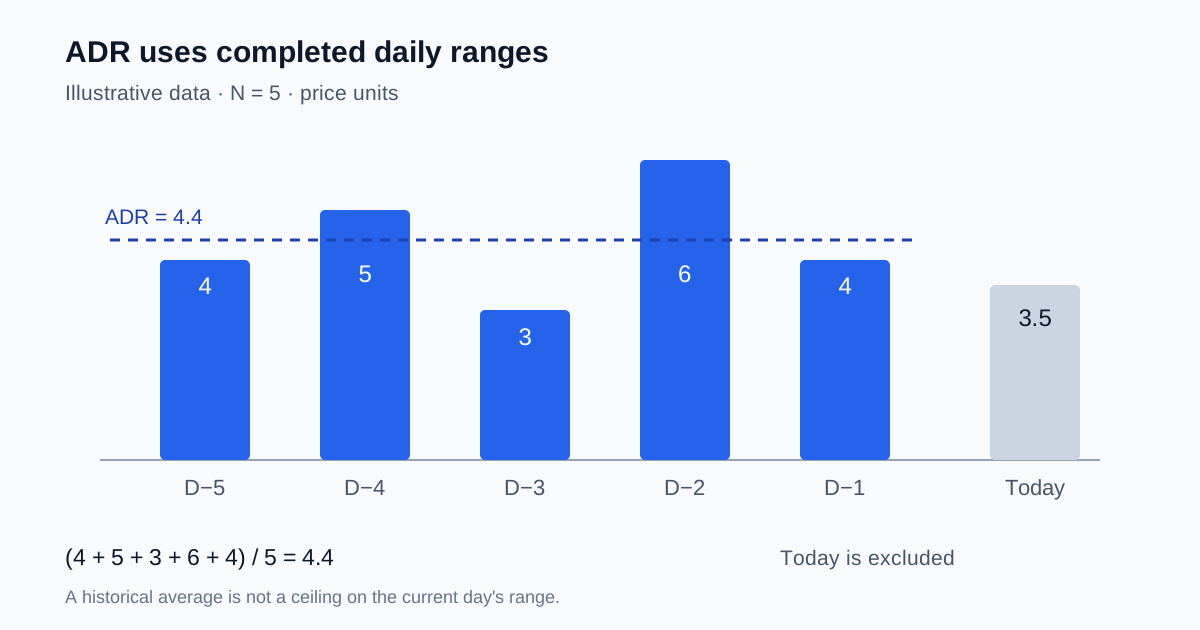
Average Daily Range (ADR) is the mean of daily high minus daily low over a chosen number of days. Use daily data even when viewing an intraday chart. The example below holds the average of completed days steady during the current day.
ADR measures range size. It does not predict direction, cap the next move, or guarantee a target. Here ADR means Average Daily Range, not Advance/Decline Ratio.
Calculate the daily high-to-low average
For completed daily bars, add each high-to-low range and divide by N. This is also the average of the highs minus the average of the lows when both use the same N observations.
| Completed day | High | Low | High − low |
|---|---|---|---|
| D−5 | 103 | 99 | 4 |
| D−4 | 105 | 100 | 5 |
| D−3 | 104 | 101 | 3 |
| D−2 | 108 | 102 | 6 |
| D−1 | 107 | 103 | 4 |
The sum is 22, so ADR(5) = 22 / 5 = 4.4. If the current day has high 108 and low 104.5, its developing range is 3.5. Including it while dropping D−5 would produce (5 + 3 + 6 + 4 + 3.5) / 5 = 4.3. That is a different window with an unfinished observation.
TradingView lets you set a calculation timeframe for its built-in Average Daily Range indicator. A direct high-minus-low average on a 15-minute chart measures 15-minute ranges unless daily data is requested explicitly.
Pine Script: ADR from completed daily bars
Paste this complete script into Pine Editor. The blue line is ADR; the orange line is the last completed daily range and can be hidden in Inputs. Both are expressed in quoted price units.
//@version=6
indicator("ADR: completed daily bars", overlay = false, format = format.price)

int length = input.int(14, "Completed daily bars", minval = 1)
bool showLastRange = input.bool(true, "Show last completed daily range")

if not (timeframe.isintraday or (timeframe.isdaily and timeframe.multiplier == 1))
    runtime.error("Use an intraday or 1D chart.")

// Exchange-defined regular session; for many futures this is the electronic session.
string dailyTicker = ticker.new(syminfo.prefix, syminfo.ticker, session.regular)
// Offset both expressions: only completed daily bars enter the displayed values.
[adr, lastRange] = request.security(dailyTicker, "1D", [ta.sma(high - low, length)[1], high[1] - low[1]], gaps = barmerge.gaps_off, lookahead = barmerge.lookahead_on)

plot(adr, "ADR of completed days", color = color.blue, linewidth = 2, style = plot.style_stepline)
plot(showLastRange ? lastRange : na, "Last completed day range", color = color.orange)
Use an intraday or 1D chart.
The calculation happens inside the 1D request. The one-bar offsets and lookahead setting follow TradingView's confirmed higher-timeframe pattern. Values become available at the next daily period, and the first ADR value needs N completed daily observations. Removing the offsets changes the timing and can leak future daily values into historical intraday bars.
The script rejects weekly and other multi-day charts. It requests standard symbol prices and the exchange-defined regular session; use ordinary time-based candles when checking it. It does not compute today's developing range or place orders.
Keep the day and session definitions consistent
A daily bar follows the symbol's trading calendar and data feed. It is not necessarily midnight to midnight in your displayed timezone. Fourteen daily bars are fourteen trading observations, not necessarily fourteen calendar days.
The example selects session.regular explicitly. For many futures contracts, that name refers to the longer electronic session. TradingView's session documentation also distinguishes daily data from intraday extended-hours data. A daily request should not be assumed to reproduce a custom premarket-to-postmarket range.
For a custom session, aggregate intraday highs and lows within the chosen hours, timezone, and trading-day boundary before averaging completed sessions. Record those choices beside the value. Do not compare that custom range with this daily-feed ADR until their coverage has been reconciled.
ADR and ATR answer different range questions
| Measure | Per-bar input | Average |
|---|---|---|
| ADR here | High − low | SMA of completed daily ranges |
| Default ATR | max(high − low, |high − prior close|, |low − prior close|) | RMA of true range |
In an illustrative gap day with previous close 100, high 108, and low 106, the daily range is 2 while true range is max(2, 8, 6) = 8. ADR omits the gap from the prior close. ATR includes it through true range.
True range cannot be smaller than high minus low on the same bar. But default ATR and this ADR use different smoothing weights. Their final values have no universal ordering; compare identical windows and smoothing if you need to isolate the effect of gaps.
Inspect the ATR Pine Script guideRemaining range is an arithmetic difference
With the example ADR of 4.4 and today's range of 3.5, range used is 3.5 / 4.4 × 100 = 79.5% after rounding. The difference is 0.9. Neither number estimates the next move's direction or its probability.
High-to-low range is also different from distance traveled. Price can move repeatedly within existing extremes without expanding the range. A 0.9 difference therefore cannot be read as 0.9 of available upside, downside, or profit.
Check the output before adding trading rules
- Set length to 5. On a standard daily chart, record the five daily highs and lows immediately before the displayed day and reproduce their average range.
- Switch the display to 15 minutes and then one hour. Compare the blue value within the same daily period. The requested 1D window should remain the same.
- Check the next daily boundary: the oldest completed day drops out and the newly completed day enters. Do not expect an update from an unfinished daily high.
- Confirm ticker, price adjustments, daily feed, and session coverage before comparing another ADR script. A chart-bar average or live-day average is a different calculation.
- Check warmup bars and zero ranges. Treat unavailable ADR as missing; if calculating range-used percentage separately, require ADR to be positive before dividing.
This is a calculation example, not investment advice or a tested trading strategy. Entry timing, exits, fees, slippage, gaps, and position sizing require separate definitions and evaluation.
Turn the ADR definition into a script brief
Give Pineify's Pine Script AI Coding Agent the daily lookback, session definition, and confirmation rule. Ask for readable plots and inspect the values before adding entries or exits.
Build an ADR indicator using N completed daily bars. Keep the daily reference fixed during the open day. State the requested session, show the previous daily range separately, and reject unsupported chart timeframes. Explain how to verify each output against daily OHLC.Open Pine Script AI Coding Agent
ADR questions
ADR means Average Daily Range: the arithmetic mean of daily high minus daily low over N daily bars. This page does not cover the Advance/Decline Ratio, which uses market breadth data. ADR describes range size, without a direction or a probability that a future target will be reached.
Open Indicators, search for Average Daily Range, and inspect the calculation Timeframe and Length settings. Choose daily data when you want a daily measure. To use the completed-day version on this page, paste its code into Pine Editor, save it, and add it to an intraday or 1D chart. Compare its value with the previous completed daily window.
It calculates fourteen bars in its execution context. On a 15-minute chart that means fourteen 15-minute ranges. The example requests the expression inside a 1D context and excludes the developing daily bar. Changing the display chart from 15 minutes to one hour therefore does not change the intended daily lookback.
That is a calculation choice that must be stated. Including the open daily candle makes the average change as its high or low changes. The code here uses only completed daily bars, so the reference updates when the next daily period begins. It deliberately does not react to the current day until that day is complete.
True range is at least as large as high minus low for the same bar. An ordering of their averages follows when both use the same observations and averaging weights. Default ATR uses RMA while this ADR uses SMA; those different weightings do not support a universal ATR-greater-than-ADR rule.
It means the current high-to-low range equals the selected historical average, if both measurements use compatible sessions. The average is neither a ceiling nor a reversal level. A day can finish below, at, or above that reference. A negative ADR-minus-current-range value records an exceedance rather than a negative amount of possible movement.
The example starts at 14 completed daily bars as an editable illustration, not an optimized setting. A shorter window replaces old observations sooner; a longer window retains them longer. Raw ADR is in quoted price units, so forex values are not automatically pips. TradingView ADR% divides ADR by close and multiplies by 100; record which close and confirmation timing you use.
You can test a rule that uses ADR as one input, but ADR alone does not specify an entry, exit, position size, or execution price. Define those rules and model fees, slippage, and gaps separately. The example is an indicator for checking a range calculation; it contains no orders or performance results.
Sources and related reading
Official documentation checked October 17, 2026. Numerical examples are illustrative calculations.