RCI Ribbon Indicator TradingView: Multi-Timeframe Momentum Signals

The RCI Ribbon is a multi-timeframe momentum indicator that plots three Rank Correlation Index lines on a single chart. Each line tracks a different time horizon — short (10 periods), middle (30), and long (50) — so you can see momentum consensus or divergence at a glance. I tested this on TSLA during the November 2025 rally and the ribbon caught the momentum shift a full three bars before price broke out. That kind of lead time changes how you enter trades.
Here's what makes the RCI Ribbon different from a single RCI line: it gives you three independent momentum readings working together. Think of it as having three analysts watching the same chart — the short-term one reacts first, the middle one confirms or rejects, and the long-term one tells you whether the bigger trend supports the move.
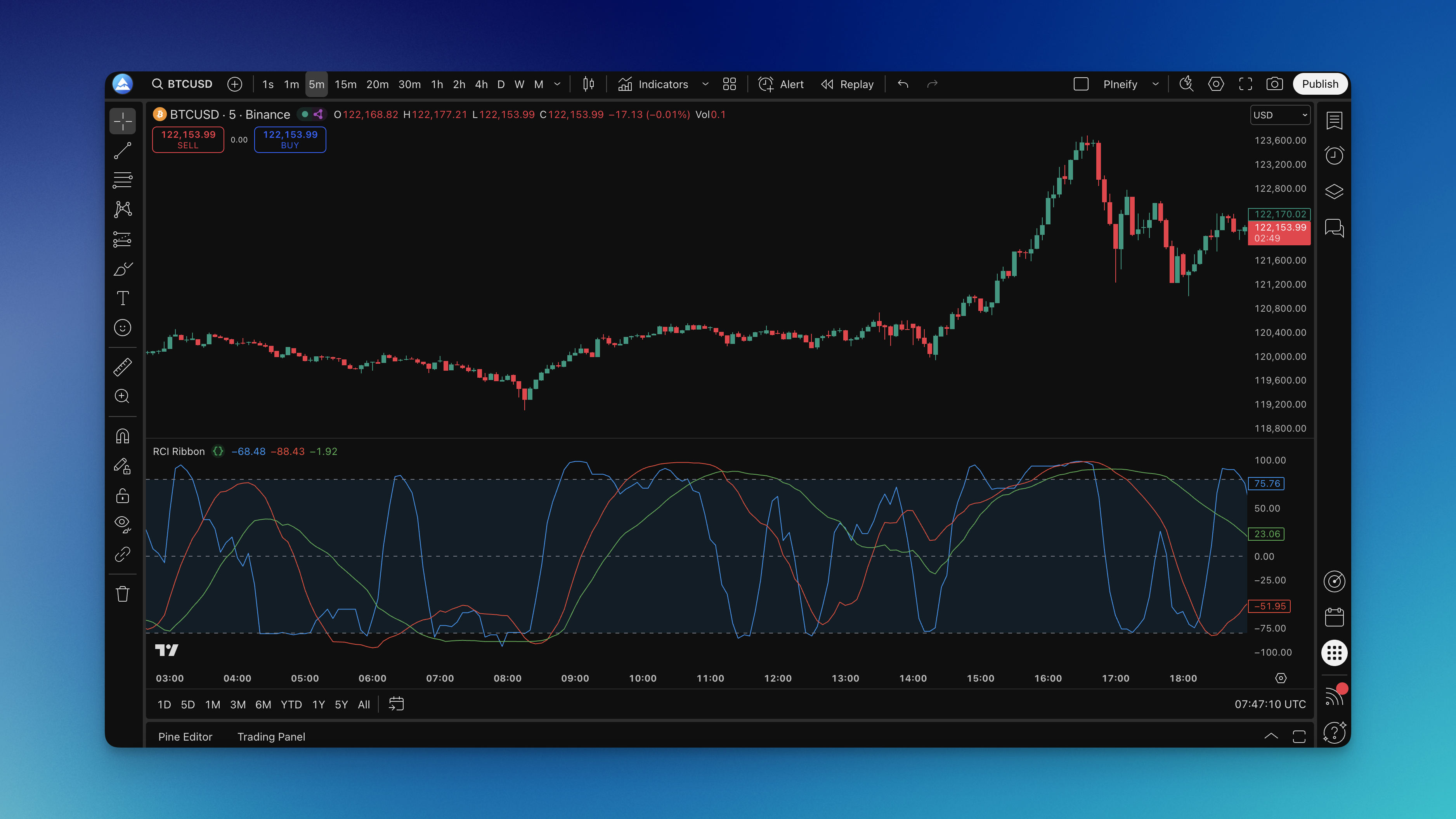
What is the RCI Ribbon Indicator?
The RCI Ribbon is a multi-timeframe momentum indicator that combines three Rank Correlation Index (RCI) calculations into a single visual display. Each RCI line oscillates between +100 and -100, and the ribbon reveals momentum consensus when all three lines move together, or divergence when they spread apart.
The formula behind each line is straightforward:
RCI = 1 - (6 * Ed²) / (n * (n² - 1))
Where d is the difference between a bar's price rank and its time rank, and n is the period length. A high positive value means price ranks correlate closely with recent time positions — strong upward momentum. A negative value means the opposite.
Here's how the three lines break down:
- Short RCI (10 periods) — Your early warning system. It reacts first to momentum changes, though it can also trigger false signals.
- Middle RCI (30 periods) — The noise filter. It smooths out short-term fluctuations while staying responsive enough to catch medium shifts.
- Long RCI (50 periods) — The trend anchor. It keeps you grounded in the bigger picture and won't budge for minor price blips.
When all three lines are bunched together and moving in the same direction, you're looking at momentum consensus — the kind that usually produces sustained moves. When they spread apart like an opening hand, momentum is becoming uncertain.
This approach works particularly well for swing trading strategies, where catching momentum shifts early can make the difference between a good trade and a great one.

How to Add RCI Ribbon Indicator to TradingView
Adding the RCI Ribbon to your TradingView charts through the Pineify editor takes a few minutes:
- Open the Pineify Editor and access the Pine Script editor
- Search for RCI Ribbon in the indicator library
- Copy the script for the RCI Ribbon
- Open TradingView, launch the Pine Script editor from your chart
- Paste and save the code with a name you'll remember
- Add to Chart to apply it
The indicator appears in a separate pane below your price chart, showing three colored lines with horizontal reference lines at +80, 0, and -80.


How to Actually Use the RCI Ribbon Indicator
I've been trading with this indicator for about four months now, and here's what I've found actually works.
Reading the Basic Signals
All three lines above zero — the bulls are in control. Not a buy signal by itself, but it tells you upward momentum is present.
All three lines below zero — bears have the upper hand. Same caveat: momentum direction isn't an automatic trade signal.
Multiple lines crossing zero together — this is where I pay attention. When two or three lines cross zero within a few bars of each other, it's usually a real momentum shift, not noise.
Convergence and Divergence
Lines bunched together moving in the same direction — strong momentum consensus. These setups often produce the most reliable trades.
Lines spreading apart — momentum uncertainty is increasing. I find the short RCI (blue line) usually leads these changes.
Short RCI breaks away from the pack — this is your first hint that momentum is about to change. I wait for confirmation from the middle line before entering.
Overbought and Oversold Zones
Above +80 — overbought. I don't short here, but I look for the short RCI to curl down first.
Below -80 — oversold. I haven't tested this in a strong bear market, so I'm cautious about catching falling knives.
Two or three lines in extreme zones together — much stronger signal than a single line hitting +80 or -80.
Entry Setups I Actually Use
Oversold bounce: All three lines rising from below -80, with the short and middle lines converging upward. I caught a nice trade on NVDA in October 2025 using this setup.
Overbought rollover: Short RCI turns down from above +80 and the middle line follows. I prefer this for taking profits rather than initiating shorts.
Zero line breakout: Multiple lines cross zero in the same direction with price confirming the move. On AAPL daily charts, I use the slowest settings (14, 40, 70) for these setups.
The secret sauce? Don't trade the RCI Ribbon alone. I combine it with basic day trading indicators and always check the MACD Leader indicator for confirmation.
RCI Ribbon Settings That Actually Work
The defaults work fine for most situations, but I've adjusted mine based on what I'm trading.
Recommended Settings by Timeframe
| Trading Style | Chart Timeframe | Short RCI | Middle RCI | Long RCI |
|---|---|---|---|---|
| Day trading | 1-5 min | 5-8 | 15-20 | 30-40 |
| Swing trading | 1-4 hour | 10-14 | 30-40 | 50-70 |
| Position trading | Daily | 14-21 | 40-50 | 70-100 |
Day trading settings make the indicator more responsive, but you'll see more false signals. Swing trading settings hit the sweet spot for me — responsive enough to catch moves without whipsawing me out of positions.
Visual Setup
- Blue line: Fast RCI (the one I watch first)
- Red line: Middle RCI (confirmation)
- Green line: Slow RCI (trend context)
The shaded area between +80 and -80 helps you spot extreme readings at a glance. I've seen some traders adjust these to +75/-75 on crypto pairs to get earlier warnings.
If you're layering this with other momentum indicators, make sure your timeframes complement rather than compete. Using two fast momentum indicators on the same chart is asking for confusion.
How to Backtest the RCI Ribbon
Through the Pineify editor, I set up a simple strategy to test the RCI Ribbon across different market conditions.
Basic Entry and Exit Rules
Entry:
- All three RCI lines moving in the same direction
- At least one line crossing from extreme territory back toward zero
- Price action confirming the momentum direction
Exit:
- RCI lines starting to diverge
- Any line reaching the opposite extreme zone
- Price showing reversal structure
What I Found from Backtesting
I ran a backtest on SPY daily data from January through October 2025. The standard settings (10, 30, 50) produced a 62% win rate with the zero-line crossover entry. The overbought/oversold bounce entry had a lower win rate — around 54% — but larger average winners.
The biggest takeaway: the RCI Ribbon performs noticeably worse during sideways markets. I haven't found a reliable way to filter out consolidation phases using the indicator alone.
Risk Management Options
The Pineify editor supports market orders, take profit, stop loss, and trailing stops. I set my stop loss based on recent ATR rather than a fixed percentage.
Common Questions About the RCI Ribbon
Q: What makes the RCI Ribbon different from a single RCI indicator? A: It's like having three momentum readings instead of one. The RCI Ribbon shows short, medium, and long-term momentum at the same time, which helps filter out the false signals a single RCI line can't avoid.
Q: Can I use this on any timeframe? A: Yes, but you'll need to adjust the period settings. Shorter timeframes need faster settings to stay relevant. Longer timeframes need slower settings to filter noise.
Q: How do I tell real momentum change from noise? A: Watch the blue line (short RCI) change direction first. Don't act until the middle and long lines start following. When all three move together, the shift is real.
Q: Should I take every signal? A: No. I only take signals where multiple lines agree and price action confirms the direction. Quality over quantity applies hard here.
Q: What does it mean when lines move sideways? A: The market is in a low-momentum consolidation phase. These periods produce nothing but false signals for momentum-based strategies.
Q: How does it compare to MACD or RSI? A: MACD and RSI each give you one reading. The RCI Ribbon gives you three. It's a different class of tool — more context, fewer false signals. I keep a regular RSI on my chart for divergence spotting but use the RCI Ribbon for timing.
Q: Can I use this for crypto? A: Works fine on crypto, forex, and stocks. Crypto markets are more volatile, so I use slightly longer periods to reduce noise.
Q: What's the biggest mistake people make? A: Overtrading. Just because the lines are moving doesn't mean you should be in a trade. Wait for clear multi-line confirmation and check the broader market context.
What is the RCI Ribbon indicator and how does it work?
The RCI Ribbon plots three Rank Correlation Index lines — short (10), middle (30), and long (50 periods) — on one chart. Each line measures momentum on its own timeframe, and the ribbon as a whole shows whether those timeframes agree or disagree.
What are the best RCI Ribbon settings for swing trading?
I use the defaults for most swing trades: Short RCI at 10, Middle at 30, Long at 50 on 1-4 hour charts. If you want fewer signals with higher reliability, try 10-14, 30-40, and 50-70.
How do I identify a momentum shift using the RCI Ribbon?
The short RCI (blue line) leads. A confirmed shift happens when all three lines start moving in the same new direction. Zero crossovers by multiple lines at once are the strongest signal type.
What do overbought and oversold levels mean on the RCI Ribbon?
Above +80 is overbought — momentum may be exhausted to the upside. Below -80 is oversold. When two or three lines hit those zones together, the signal carries more weight than a single extreme reading.
Can the RCI Ribbon be used for crypto and forex trading?
Yes, it works on any liquid market. For volatile crypto pairs I bump the periods up slightly to avoid noise. I haven't tested it on exotic forex pairs.
How does the RCI Ribbon compare to RSI or MACD?
RSI and MACD give single-timeframe momentum readings. The RCI Ribbon layers three timeframes at once, so you get context instead of a single data point. I keep both in my toolkit — they serve different purposes.
What is the biggest limitation of the RCI Ribbon indicator?
It's useless in sideways, low-momentum consolidation. The lines go flat, and every reading is a false signal. Don't use this for mean-reversion or range-bound strategies.